Please follow the SOP below whenever a customer reaches out to us about the Rent/tuition payments:
Different statuses and their communications:
1. Failed RentPay Payments:
Check the Metabase link to check the status of the transaction
Step 1: Gather Transaction Details
Ask the customer for transaction details to initiate a check. The required details are the SM Order ID, SM User ID, or the sender's contact number.
Step 2: Verify Transaction Status
Use the provided link to access the internal transaction tool.
Search for the transaction using the details gathered in Step 1.
In the transaction details, navigate to the “Beneficiaries - Product Details Pan” section and check the Status field.
If the status is 'FAILED', proceed with the communication.
Step 3: Communicate the Refund Process
Inform the customer that the transaction has failed.
Explain that the amount will be refunded to their credit card within 5-7 working days.
Advise the customer that if they still wish to make the payment, they should retry the transaction.
Taggings: L1: Rent Pay, L2: Transaction Issues, L3: Payment Failed
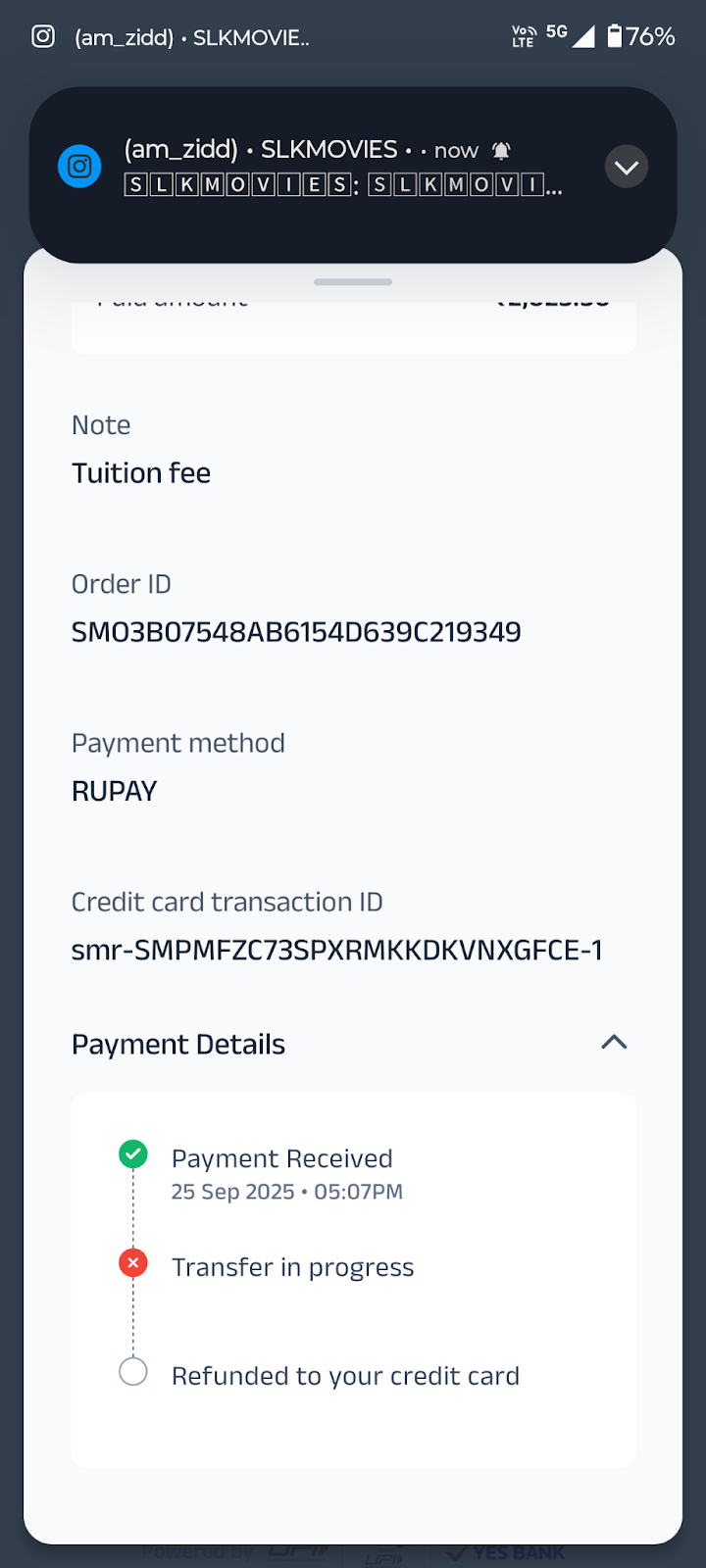
Email Template
Subject: Update on Your Recent Rent Payment
Dear User,
Thank you for reaching out to us.
We have checked your recent Rent/Tuition transaction and can confirm that it has failed.
Please be assured that any amount debited will be refunded to your credit card within 5-7 working days.
If you wish to make this payment, you can retry the transaction at your convenience.
We apologize for any inconvenience this may have caused.
Best regards,
super.money Support Team
2. Handling Deferred Payment Queries
Check the Metabase link to check the status of the transaction.
Step 1: Gather Customer Details
Ask the customer for transaction details to initiate a check. The required details are the Order ID, SM User ID, or the sender's phone number.
Step 2: Access Internal Tool
Use the provided internal link to access the transaction dashboard.
Search for the specific transaction using one of the details gathered in Step 1.
Step 3: Find the Expected Transfer Date
In the transaction details, locate the expected_transfer_date field.
Note the date and time to share with the customer.
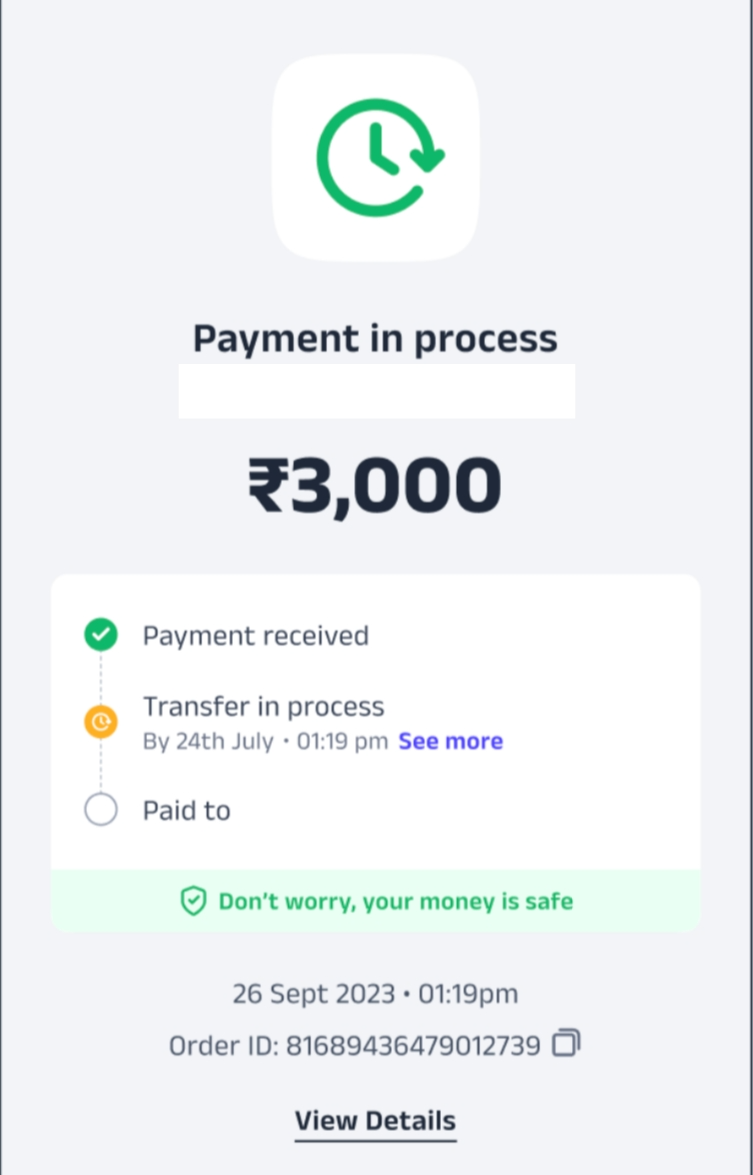
Step 4: Communicate with the Customer
Inform the customer that their payment is being processed.
Provide the expected_transfer_date and tell them that the recipient will receive the amount by that time.
Taggings: L1: Rent Pay, L2: Transaction Issues, L3: Payment Successful, Not Credited
Email Template
Dear user,
Thank you for your patience. This is to confirm that your payment of ₹[Amount] to [Recipient Name] is currently under a security review to ensure the safety of your funds.
The payment will be credited to the recipient's bank account by [Date/Time]. We will send you a notification as soon as the transfer is complete.
Thank you for your understanding.
Best regards,
super.money Support Team
2.1. Deferred Payments (> 48 hrs)
Purpose
To provide a standardized procedure for agents to assist customers with deferred RentPay payments that have not been resolved after 48 hours.
Procedure
Step 1: Verify Transaction Status
Access the Metabase to confirm that the transaction status is still "Deferred".
Verify that more than 48 hours have passed since the transaction was initiated.
Step 2: Escalate the Issue
Create a child ticket for this specific transaction.
In the ticket, provide the transaction ID, customer details, and a brief description of the issue.
Escalate the child ticket to the ‘Product Managers’> ‘Abhiskek Kumar’.
Taggings: L1: Rent Pay, L2: Transaction Issues, L3: Payment Successful, Not Credited
Step 3: Communicate with the Customer
Inform the user that their concern has been escalated to the product team for review.
Request a new timeline of 2 working days for a resolution.
Do not promise a specific outcome (e.g., successful payment), but you can inform them that a refund will be processed if a successful payment cannot be completed.
Email Template
Subject: Update on your RentPay transaction
Dear user,
We apologize for the continued delay with your recent RentPay transaction.
We have escalated your concern to our internal team, and they are investigating the issue as a priority.
We will initiate a refund, and the amount will be credited to your source credit card within 2 working days.
Thank you for your patience and understanding.
Best regards,
super.money Support Team
2.2. Deferred Payment Cancellation Requests
Step 1: Verify Transaction Status
Access the internal dashboard to confirm the transaction status is "Deferred".
Step 2: Communicate the Inability to Cancel
Acknowledge the customer’s request to cancel the payment.
Inform the customer that a payment cannot be canceled once it has been initiated.
Explain that "deferred" status means the transaction is under a security review.
Step 3: Set Expectations for the Outcome
Do not promise a cancellation.
Explain the two possible outcomes:
The payment will be successfully processed and credited to the recipient's account.
The payment will fail the security check, and the amount will be automatically refunded to the customer.
Reassure the customer that their money is safe during this period.
Taggings: L1: Rent Pay, L2: Transaction issues, L3: Cancellation request
Dear user,
Thank you for reaching out. I understand you want to cancel your deferred rent payment.
Your payment is currently under a security review to ensure the safety of your funds. Unfortunately, once a payment is initiated, it cannot be canceled from our end.
Please be assured that your money is safe during this time. The payment will either be processed and sent to the recipient, or if it fails the security checks, the amount will be automatically refunded to you.
We will notify you as soon as the final status is updated. We appreciate your patience.
Regards,
super.money Support Team
2.3. If the payment is deferred in the screenshot, and we are unable to fetch data in Metabase. (<48 Hours)
If it is >48 hours, and the user is stuck in the deferred payment screen. Follow 2.1 above.
Dear User,
Thank you for reaching out.
We completely understand the urgency of your rent/ tuition payment. However, for security reasons, all rent/tuition transactions go through a standard review process. This process cannot be expedited, and the payment will be credited to the recipient’s account within 48 hours from the time of initiation.
You can track the live status anytime in the super.money app:
Open the super.money app.
Tap the Rent/Tuition Fee icon.
Go to Transaction History (top right corner).
Select the specific transaction for details.
Note: Please check the image below for reference.
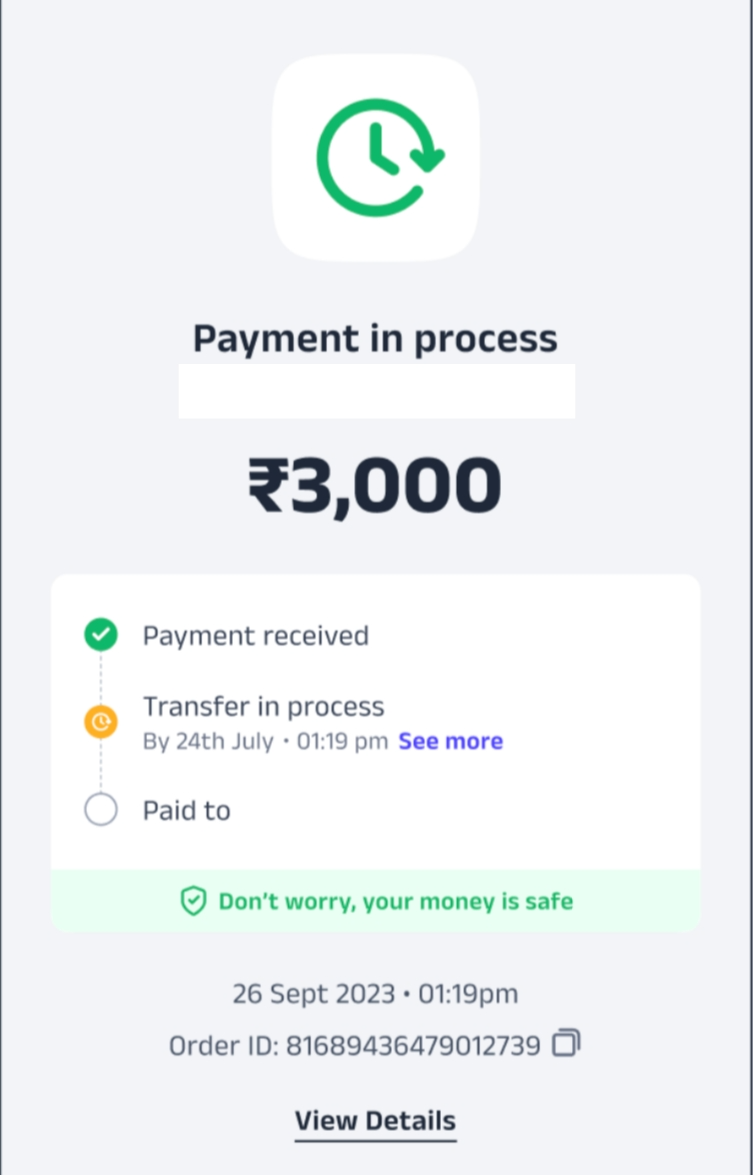
We appreciate your understanding and patience as we work to keep your funds safe.
Best regards,
super.money Support Team
3. CC Payment Success
Check the Metabase link to check the status of the transaction.
Subject: Your Credit Card Payment Is Being Processed
Trigger: Customer receives an SMS notification of a successful credit card payment.
Taggings: L1: Rent Pay, L2: Transaction Issues, L3: Payment Success
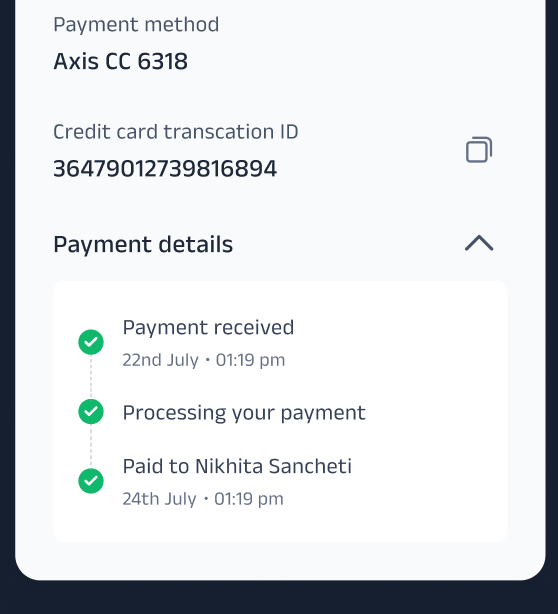
Dear user,
This is to confirm that your credit card payment of ₹[Amount] to [Recipient Name] has been received on our end.
The amount has been successfully deposited into the recipient's bank account.
Thank you for using super.money!
Best regards,
super.money Support Team
4. Fraud Signal Received, Money Reversed
Subject: Your Transaction Has Been Cancelled
Trigger: Customer receives an SMS or PN that their transaction has been canceled due to security reasons.
Taggings: L1: Rent Pay, L2: Transaction issues, L3: Payment Failed
Dear user,
This is to inform you that your transaction of ₹[Amount] to [Recipient Name] has been cancelled due to security reasons.
We have initiated a full refund to your credit card. Please allow 5-7 business days for the refund to reflect in your account statement.
We apologize for any inconvenience and thank you for your understanding.
Best regards,
super.money Support Team
5. Guiding Customers to Check Rent/Tuition Transactions History
Procedure:
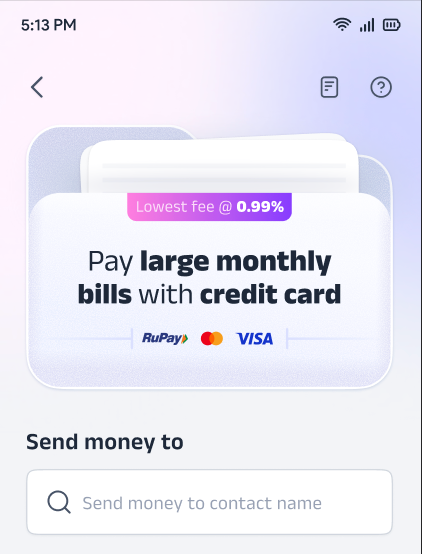
Instruct the customer to open the super.money app.
Direct them to the 'Rent/Tuition fee' icon.
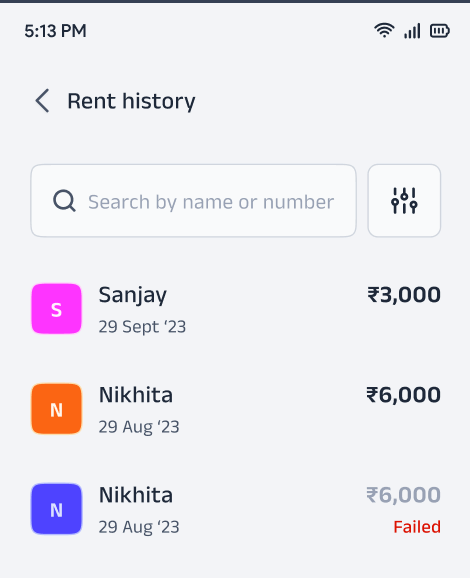
Tell them to navigate to the 'Transaction History' tab.
Dear User,
Thank you for reaching out. To check the transaction history of your rent/tuition fee, you can easily find all the details directly in your app.
Here are the steps to follow:
Open the super.money app.
Click on the 'Rent/Tuition fee' icon.
In the top right corner, click on the 'Transaction History' tab.
Select the specific transaction to view its details and the expected credit time.
You will find the most up-to-date information there. If you have any further questions, please feel free to reach out.
Best regards,
super.money Support Team
6. Successful RentPay, Receiver Claims Money Not Credited.
Purpose
To provide a standardized procedure for agents to assist customers whose Rent/Tuition fee payment shows as successful but has not been received by the recipient.
Procedure
Step 1: Verify Transaction Status
Access the Metabase and verify that the transaction status is indeed "Success".
Step 2: Communicate the Status and Reason for the Delay
Inform the customer that the payment was successful on our end.
Explain that the delay is likely due to server or technical issues at the receiver's bank.
Reassure the customer that their money is safe.
Step 3: Set Expectations and Timeline
Advise the customer that it may take up to 48 hours for the amount to reflect in the recipient's account.
Step 4: Guide Customer to Next Steps
If the recipient still has not received the money after the 48-hour period, instruct the customer to ask the recipient to contact their bank directly for further investigation.
Taggings: L1: Rent Pay, L2: Disputes & Refund, L3: Receiver Claims Money Not Credited
Email Template
Subject: Regarding your recent Rent/Tuition fee payment
Dear user,
Thank you for reaching out to us.
We have checked your recent payment and can confirm that the transaction was successful on our end.
If the recipient has not yet received the funds, please don't worry. This sometimes happens due to server issues at the receiver's bank and can take up to 48 hours for the amount to reflect in their account.
If the recipient still does not see the money after this period, we kindly request that they contact their bank directly for further assistance.
Thank you for your understanding.
Best regards,
super.money Support Team
7. Fraudulent Rent/Tuition Payments
Purpose
To provide a standardized procedure for agents to handle customer reports of a fraudulent or unauthorized Rent/Tuition fee payment made with their credit card.
Procedure
Step 1: Acknowledge and Verify
Begin the interaction by empathizing with the customer. Acknowledge the seriousness of the fraud report.
Verify the transaction details in the internal dashboard (transaction ID, amount, and date) but do not ask the customer for any additional details about the fraud.
Step 2: Do Not Investigate
Crucial: Do not promise to investigate the fraudulent transaction. The agent's role is to guide the customer to the correct authorities.
Step 3: Provide Actionable Steps
Instruct the customer to take the following two immediate and mandatory steps:
Contact their credit card bank: Advise the customer to contact their bank's fraud department immediately to block the card and file a formal dispute.
File a police complaint: Instruct the customer to file a complaint with their local police or the cybercrime authorities.
Step 4: Communicate the Policy
Inform the customer that the fraud investigation and any potential refund will be handled by their bank and the authorities, not by our app directly.
Use the email template below to provide the final written response.
Taggings: L1: Rent Pay, L2: Disputes & Refund, L3: Fraud Payment
Email Template: Fraudulent Payment
Subject: Important: Action Required for Your Reported Fraudulent Transaction
Dear User,
Thank you for bringing this to our attention. We are deeply concerned to hear that you've been a victim of a fraudulent payment.
Because this is a matter of fraud involving your credit card, we cannot investigate the issue or initiate a refund from our app. The security of your account and funds is our top priority, and we recommend that you act immediately.
Here are the two crucial steps you must take to report the fraud:
Contact Your Bank Immediately: Please call your credit card bank's fraud department. Inform them about the unauthorized transaction and request to block your card.
File an Official Complaint: Report this incident to your local police or the cybercrime authorities. This is a mandatory step for any legal recourse.
We sincerely apologize for this experience and will assist you with any information the bank or authorities require from us.
Best regards,
super.money Support Team
8. Authorized Rent/Tuition Payments(Scam)
Purpose
To provide a standardized procedure for agents to handle customer reports of a fraudulent payment where the user authorized the transaction.
Procedure
Step 1: Acknowledge and Verify
Begin the interaction by empathizing with the customer. Acknowledge the seriousness of the fraud report.
Step 2: Do Not Promise an Investigation
Crucial: Do not promise to investigate the fraudulent transaction or initiate a refund. The agent's role is to guide the customer to the correct authorities.
Step 3: Provide Actionable Steps
Instruct the customer to take the following two immediate and mandatory steps:
Contact their credit card bank: Advise the customer to contact their bank’s fraud department immediately to file a formal dispute.
File a police complaint: Instruct the customer to file a complaint with their local police or the cybercrime authorities.
Step 4: Communicate the Policy
Inform the customer that the fraud investigation and any potential refund will be handled by their bank and the authorities, not by our app directly.
Use the email template below to provide the final written response.
Taggings: L1: Rent Pay, L2: Disputes & Refund, L3: Authorized Payment(Scam)
Email Template: Fraudulent Payment
Subject: Important: Action Required for Your Reported Fraudulent Transaction
Dear User,
Thank you for bringing this to our attention. We are deeply concerned to hear that you've been a victim of fraud.
Because this payment was authorized by you, we cannot reverse the transaction from our end. The security of your account and funds is our top priority, and we recommend that you act immediately.
Here are the two crucial steps you must take to report the fraud:
Contact Your Bank Immediately: Please call your credit card bank's fraud department. Inform them about the fraudulent transaction and request that they file a dispute.
File an Official Complaint: Report this incident to your local police or the cybercrime authorities. This is a mandatory step for any legal recourse.
We sincerely apologize for this experience and will assist with any information the bank or authorities require from us.
Best regards,
super.money Support Team
9. Cancellation/Chargeback for Rent/Tuition
Purpose
To provide a standardized procedure for agents to assist customers who have made a successful Rent/Tuition payment and now wish to cancel the transaction or raise a chargeback.
Procedure
Step 1: Verify Transaction Status
Access the Metabase to confirm that the transaction was successful.
Step 2: Communicate the Policy on Reversals
Acknowledge the customer’s request to cancel or reverse the payment.
Inform the customer that once a credit card payment is successful, the funds are instantly transferred and cannot be reversed by our app.
Explain that a chargeback is a formal process that must be initiated through the credit card issuing bank.
Step 3: Provide Actionable Steps to the Customer
Do not promise a refund. Instead, provide the following steps as the only path for a resolution:
Contact Their Credit Card Bank: Instruct the user to contact their credit card bank and ask about filing a dispute or chargeback.
Provide Documentation: Advise the user to have the transaction ID, date, amount, and any other relevant documentation ready for their bank.
Step 4: Conclude the Interaction
Set clear expectations that the resolution depends on the bank's policies.
Use the email template below to provide the final written response.
Taggings: L1: Rent Pay, L2: Disputes & Refund, L3: Chargeback Inquiry
Email Template: Chargeback/Reversal Request
Subject: Regarding Your Request to Cancel a Rent Payment
Dear User,
Thank you for reaching out to us. I understand you wish to cancel a recent Rent/Tuition payment.
I have checked your transaction and can confirm that it was successful. Unfortunately, once a credit card payment has been successfully completed, it cannot be canceled or reversed from our end.
A chargeback is a formal process that can only be initiated through your credit card-issuing bank.
Here are the crucial steps you need to take to start this process:
Contact Your Bank: Please contact your credit card bank's support team and inform them of your request to raise a chargeback.
Provide Transaction Details: Be prepared to provide them with all the transaction details, including the transaction ID, the amount, and the recipient's name.
We sincerely apologize that we cannot directly reverse this for you, but your bank is the only party with the authority to initiate this process.
Best regards,
super.money Support Team
Was this article helpful?
That’s Great!
Thank you for your feedback
Sorry! We couldn't be helpful
Thank you for your feedback
Feedback sent
We appreciate your effort and will try to fix the article