superPay in 3 FAQs
Modified on Thu, 3 Sep at 11:41 AM
L1 | L2 | L3 / Answer |
About | What is splitStore? | splitStore is the built-in shopping experience on super.money where you can buy electronics, fashion, cosmetics, and more. You can use Pay in 3, our flexible 0% interest installment plan backed by NBFC credit, without needing a credit card. Taggings: L1: splitStore L2: General Queries L3: Product Features/ How to use/ Limits |
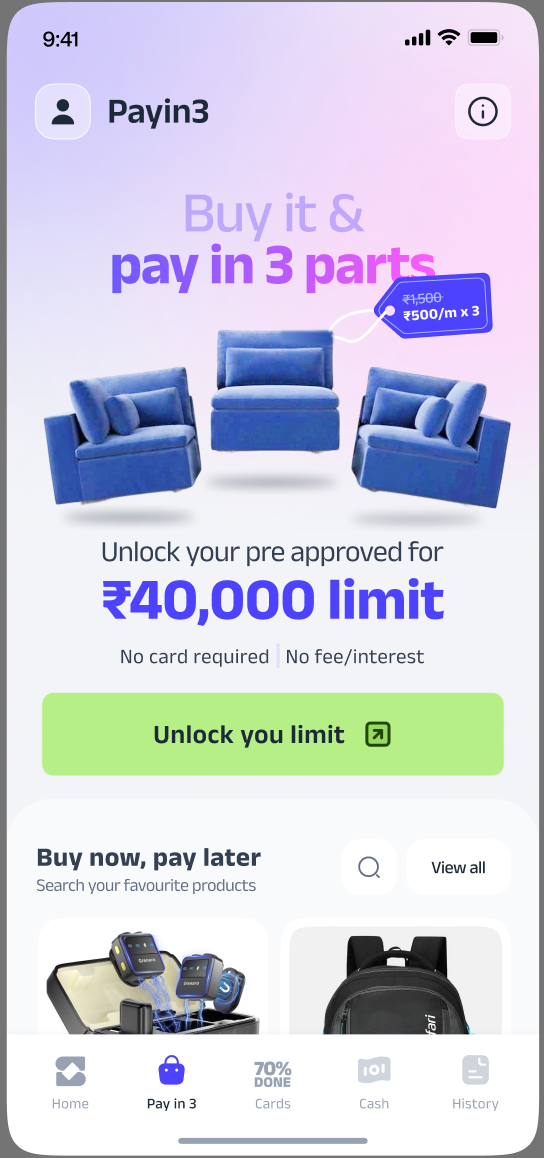
About Pay in 3 | What is Pay in 3? | Pay in 3 lets you split any purchase into three parts: one payment today as your down payment and two automatic monthly installments on fixed future dates. You enjoy 0% interest as long as you make your payments on time. Taggings: L1: splitStore L2: General Queries L3: Product Features/ How to use/ Limits |
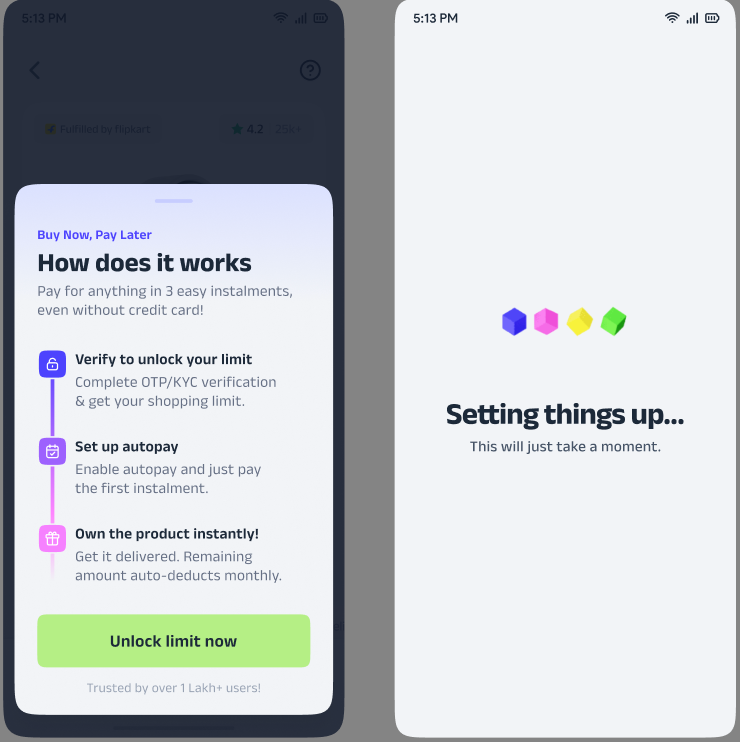
How does Pay in 3 work? | Once you're eligible, you receive a shopping limit. When you place an order: • You pay a down payment today (minimum 1/3rd of the product price) • The remaining balance is covered by your credit limit and auto-debited in 2 equal monthly installments via superUPI Autopay • Your available limit is restored as you make repayments. Taggings: L1: splitStore L2: General Queries L3: Product Features/ How to use/ Limits | |
What are the benefits of Pay in 3? | We want to make shopping easier with: • 0% interest on all timely payments • No credit card required • Instant credit decisions with no lengthy approvals • Transparent statements with no hidden charges • The ability to buy higher-value products via a variable down payment • The option to pay early to restore your limit sooner. Taggings: L1: splitStore L2: General Queries L3: Product Features/ How to use/ Limits | |
Am I eligible to use splitStore or Pay in 3? | splitStore is currently available to select users. If the splitStore section and Pay in 3 option are visible to you, you can use them immediately for any cart value above ₹1,500. We are rolling this out gradually to more users. Taggings: L1: splitStore L2: Eligibility | |
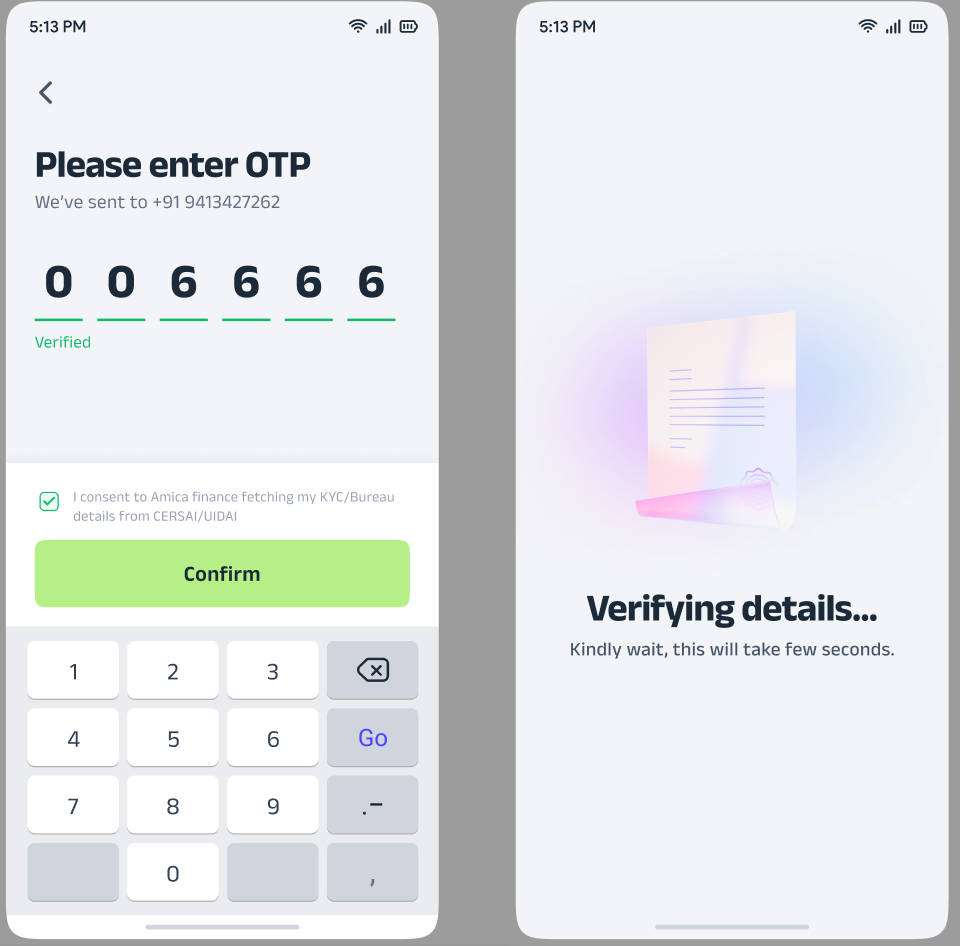
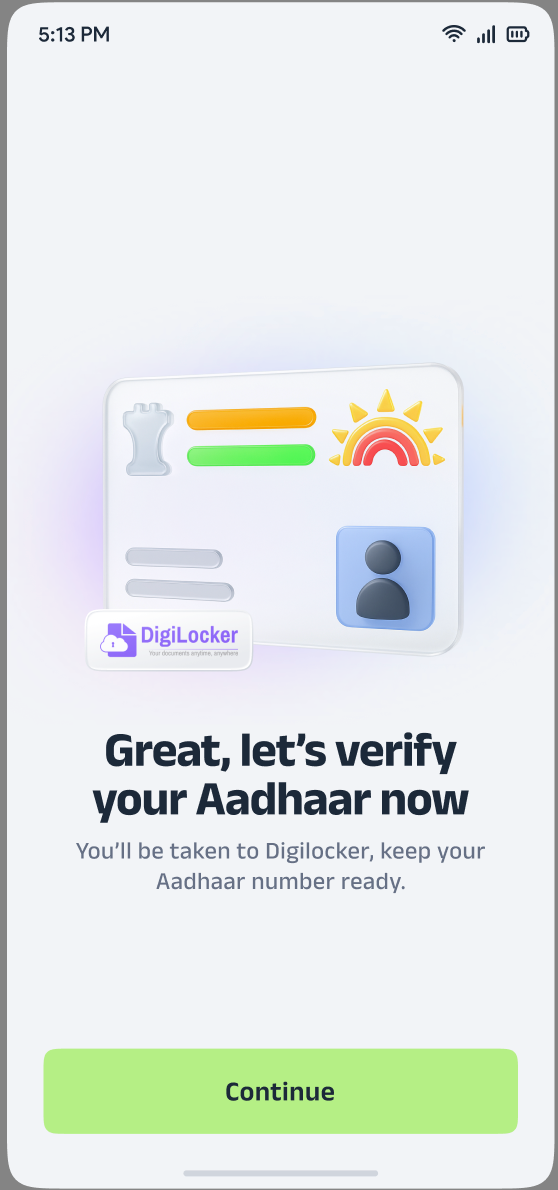
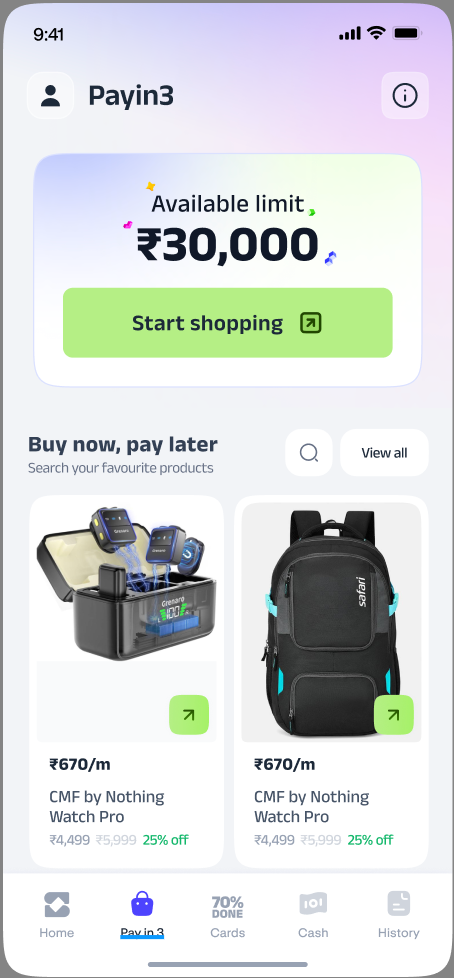
About Pay in 3 | How can I get onboarded to Pay in 3? | You can easily onboard to Pay in 3. Steps to activate Pay in 3: Step 1: Go to ‘Pay in 3’
Taggings: L1: splitStore L2: General Queries |
How do I browse products on splitStore? | To explore our catalog, tap the splitStore section on your super.money home screen and select 'View all'. You can scroll through the feed, use the category strip at the top, or use the search bar to find exactly what you're looking for. Taggings: L1: splitStore L2: General Queries L3: Product Features/ How to use/ Limits | |
How do categories and sub-categories work? | We’ve organized the store to help you find items quickly. Use the horizontal strip at the top to select main categories like Electronics or Fashion. Once selected, sub-categories like Smartphones or Speakers will appear to help you narrow down your search. Taggings: L1: splitStore L2: General Queries L3: Product Features/ How to use/ Limits | |
Why do some products show 'Additional upfront payment required'? | This tag appears when a product's price is higher than your current credit limit for a standard three-way split. You can still buy the item by paying a higher upfront amount; the remaining two installments will then be covered by your limit and auto-debited as usual. Taggings: L1: splitStore L2: General Queries L3: Product Features/ How to use/ Limits | |
Why does my search show 'Sorry, no results found!'? | This means we don't currently have a match for that specific term. We recommend checking your spelling, using simpler keywords, or browsing via categories. If an item is missing, it may currently be outside our available catalog. Taggings: L1: splitStore L2: General Queries L3: Product Features/ How to use/ Limits | |
Why does 'Plan may differ' appear next to some products? | This icon indicates that your specific Pay in 3 plan might vary from the standard 1/3rd split based on your available credit limit. This usually happens when a variable downpayment is required. Tap the product to see your personalized payment breakdown. Taggings: L1: splitStore L2: General Queries L3: Product Features/ How to use/ Limits | |
Store Products (PDP) | What does '₹X/m (3 months)' on the product page mean? | This is your Pay in 3 headline. The amount shown (₹X) is your monthly installment. In a standard plan where your limit covers the purchase, all three payments—including today’s downpayment—will be exactly the same. Taggings: splitStore > General Queries > Product Features/ How to use/ Limits |
What is 'Pay in Three (Equal)' on the payment plan section? | This is our standard interest-free plan where the product price is split into three identical installments. This option is available whenever your available credit limit is at least 2/3rd of the total product price. Taggings: splitStore > General Queries > Product Features/ How to use/ Limits | |
Why is my upfront (downpayment) amount higher than 1/3rd of the product price? | This is our Variable Downpayment feature. If a product costs more than your available limit allows for an equal split, you simply pay a bit more today. This flexibility ensures you can still buy high-value products even if they exceed your current credit limit. Taggings: splitStore > General Queries > Product Features/ How to use/ Limits | |
How exactly is my down payment calculated? | If your limit covers 2/3rd of the price, you pay exactly 1/3rd today. If the price is higher than your limit, your downpayment is calculated to cover the gap, ensuring the remaining two installments fit within your available credit. You can always see the exact breakdown in the app before you pay. Taggings: splitStore > General Queries > Product Features/ How to use/ Limits | |
My available limit is ₹0. Can I still shop? | Not immediately, but you can restore it quickly! Simply use 'Pay Early' from your dashboard or tap 'Repay dues now' on the product page. As soon as your payment is confirmed, your limit is restored and you can start shopping again. | |
What does 'Fulfilled by Flipkart' mean? | This means Flipkart handles the storage, packing, and shipping of your item. For any queries regarding delivery, tracking, or product returns, you can access Flipkart Help directly through your order page in our app. | |
What do the 'No cost EMI' and '10 day replacement' chips mean? | These are quality promises: No cost EMI means you pay 0% interest on your plan; 10 day replacement is the window provided by Flipkart to replace faulty items; and Free Delivery means there are no extra shipping costs for that product. | |
KYC & Eligibility | Why do I need to provide my PAN? | Providing your PAN is a standard requirement to comply with RBI guidelines and our lending partner's policies. It allows us to safely run a credit bureau check and instantly determine your personalized shopping limit. |
What if my PAN details aren't auto-fetched? | I understand you want to move quickly. If the automatic fetch doesn't work, you can easily enter your details manually on the 'Enter PAN details' screen. Just fill in your Name (as per PAN), PAN number, and Date of Birth carefully, check the consent box, and tap 'Continue'. Taggings: L1: splitStore L2: KYC Issues L3: PAN Entry Issues | |
What is the OTP I receive during the KYC process? | This is a highly secure 6-digit CKYC OTP sent directly to your registered mobile number. Simply enter the digits and tap 'Confirm' to verify your identity. If the timer expires before you receive it, you can easily request a new one. | |
I entered the wrong OTP. What happens? | Don't worry, you can try again. If the wrong code is entered, a red warning will appear. To keep your account secure, we limit the number of consecutive attempts. If you run out of attempts, the OTP will be temporarily blocked, and you will just need to tap 'Resend OTP' to get a fresh code. | |
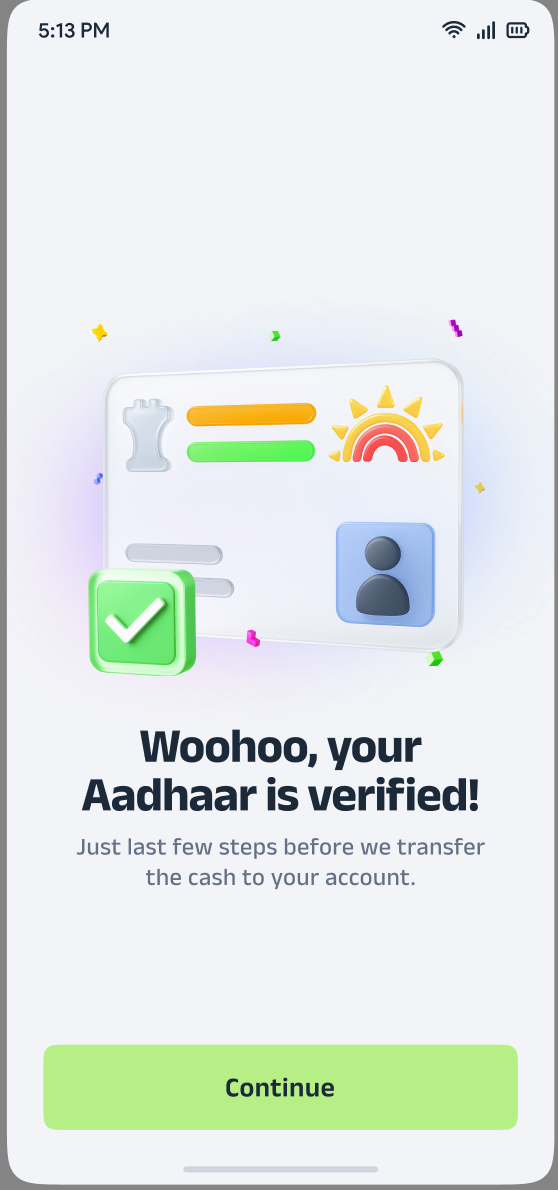
Why do I need to verify my ID document? | To comply with RBI guidelines and securely activate your credit facility, we use a standard digital verification process. If your CKYC records aren't immediately found, we easily verify your identity using a secure digital verification link to keep your onboarding smooth. | |
My verification failed. What should I do? | I understand it's frustrating to run into an error. If it's your first failure, a temporary network glitch might be the cause—simply tap 'Try again'. If it fails a second time, tap 'Okay, got it' to return to the home screen. Please note that the official authority allows a maximum of 3 verification attempts within a 24-hour window, so you can try again later if needed. Taggings: L1: splitStore L2: KYC Issues L3: Aadhar Verification Failure | |
What does 'Oops, you are not eligible right now' mean during payment? | I apologize for the inconvenience. A final security check during the payment processing stage found a mismatch that prevents us from completing this specific order. Tap 'Okay, got it' to return to the home screen, and feel free to reach out to super.money support if this continues to happen. | |
When can I re-apply after a rejection? | You can absolutely try again! Our system allows you to re-apply exactly 30 days after your last application date, giving your credit profile time to update. | |
Checkout | Why is the 'Continue' button greyed out? | To ensure your consumer rights are protected, the 'Continue' button only becomes active once you tick the consent checkbox at the bottom of the page. This confirms you have quickly reviewed your Loan Agreement and KFS. Once ticked, the button will light up so you can proceed. |
When is my first monthly EMI due? | Your second installment is due approximately 30 days after your purchase date, and your final installment is due exactly 30 days after that. These fixed dates are clearly displayed in the Loan Details section on your checkout page so you can easily plan your monthly budget. | |
Is there any interest charged on my Pay in 3 plan? | No, your Pay in 3 plan carries a 0% interest rate. The total amount you pay across all three installments matches the exact price of the product, with absolutely no hidden charges, provided your payments are made on time. | |
What does 'Powered by: Velocity Finance Pvt. Ltd.'s mean? | Velocity Finance Pvt. Ltd. is the registered Non-Banking Financial Company (NBFC) that securely provides the credit facility behind your Pay in 3 plan. super.money partners with Velocity to bring you this seamless, regulated credit experience. | |
What does 'Oops! there was some technical issue' mean? | I understand it’s frustrating to encounter a glitch during checkout. This usually happens due to a temporary bank network timeout. Don't worry—no money has been deducted. Please check your internet connection and tap 'Try again' to securely process your checkout. | |
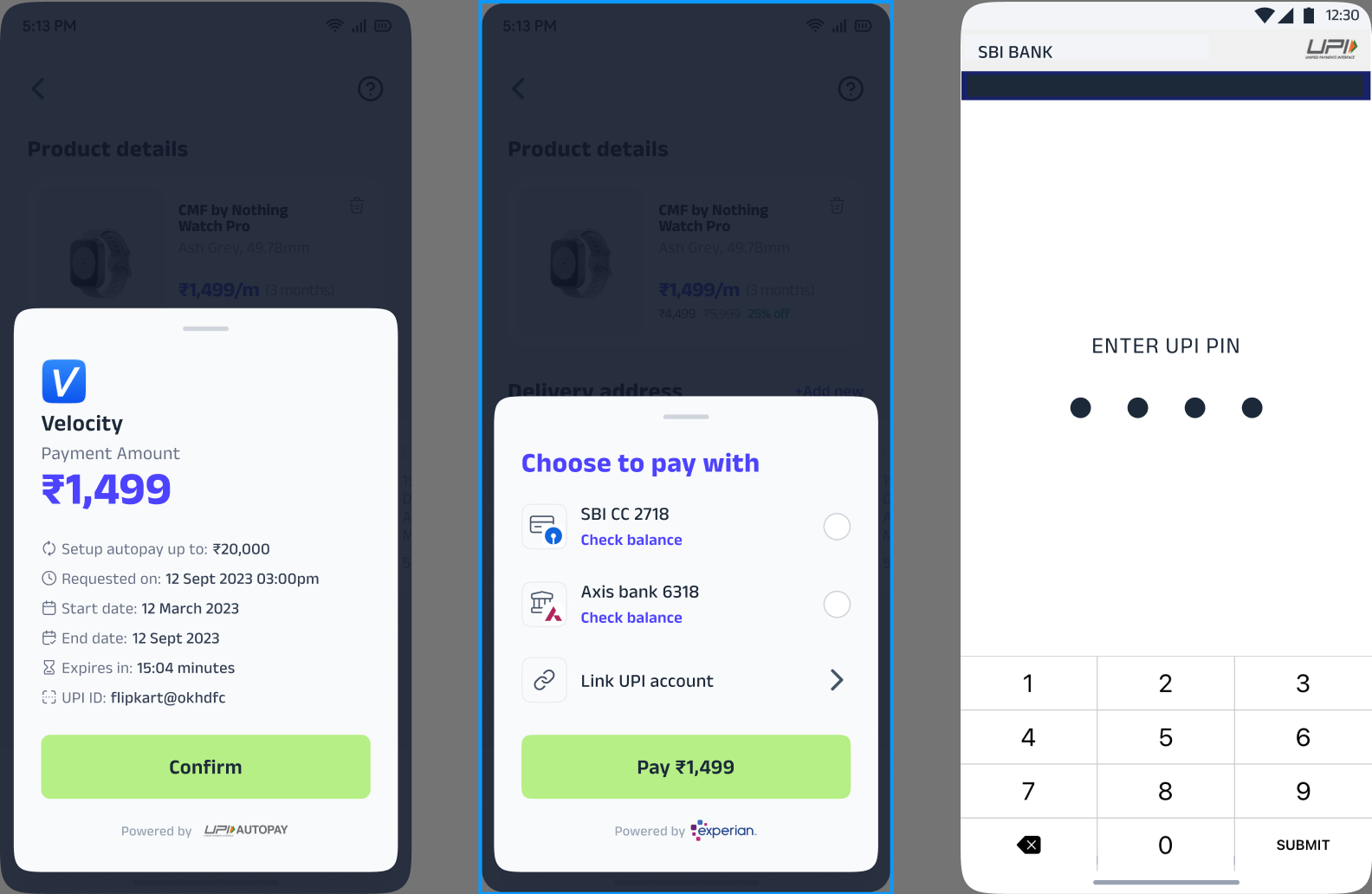
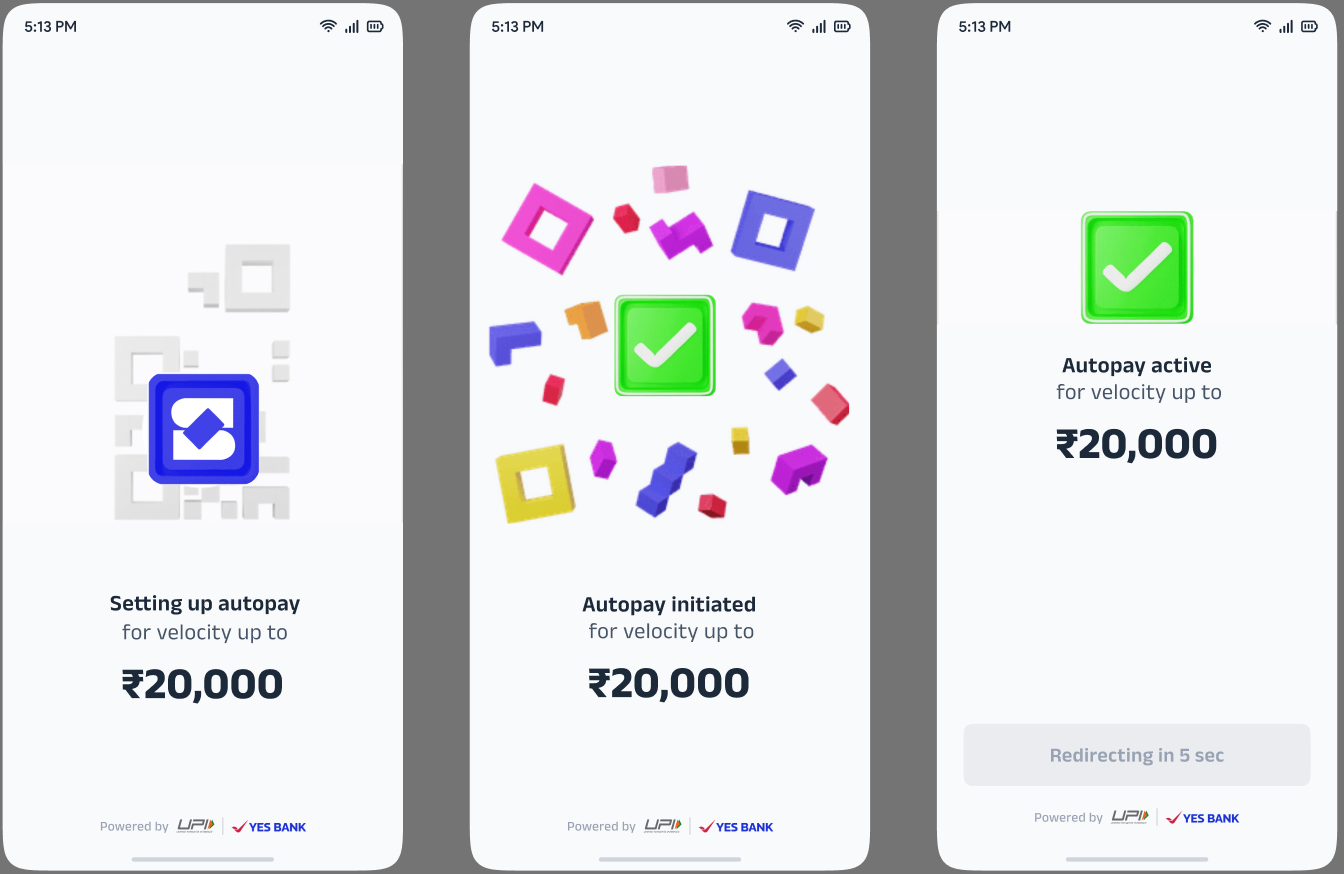
Autopay & Mandates | When and how do I set up autopay? | For your first purchase, after completing KYC and reviewing checkout, the app will smoothly guide you to the autopay setup screen showing your mandate details. Simply tap 'Confirm', select your preferred bank account, and enter your UPI PIN to authorize it. For repeat purchases, if a valid mandate already exists, this step is automatically skipped. |
How is the mandate amount determined? | To make sure your future auto-collections are processed smoothly, the mandate amount is automatically set to cover the highest possible installment under your plan. This amount is always clearly displayed on your setup screen before you enter your UPI PIN. | |
Can I set up a mandate before I shop? | Yes, absolutely! You can proactively set up a UPI autopay mandate from your super.money account settings under 'My Accounts'. If an active mandate is already in place when you checkout, our system will automatically detect it and skip the setup step entirely. | |
My autopay setup failed and I see a 'Retry' button. What should I do? | I understand it's frustrating to face a setup failure. This is usually caused by a temporary bank server glitch or network timeout. Please check your internet connection, tap 'Retry', and enter your UPI PIN carefully to attempt the setup again. | |
Will I be notified before money is auto-deducted? | Yes, we prioritize transparency. You will always receive an in-app notification and an SMS 24 to 72 hours before any scheduled deduction takes place, giving you plenty of time to ensure your linked bank account has a sufficient balance. | |
Can I change the bank account linked to my autopay? | To protect the security of your payment plan, an active mandate is locked to the bank account you initially selected. If you need to switch accounts, you will need to cancel the existing mandate and set up a new one. Please head to your account settings or reach out to super.money support for assistance. | |
Can I cancel my autopay mandate? | To comply with our lending partner's policies, mandates set up against active loans cannot be canceled until the total outstanding balance is fully repaid. For further details or special bank assistance, please reach out directly to your bank's customer support. | |
Why did my autopay fail even though I had enough balance? | I understand it’s concerning when a payment fails despite having funds. This occasionally happens due to temporary bank network congestion or UPI downtime. Don't worry—we will typically retry the payment automatically within 24 hours. Alternatively, you can clear it immediately using the 'Pay Early' button on your Pay in 3 dashboard. | |
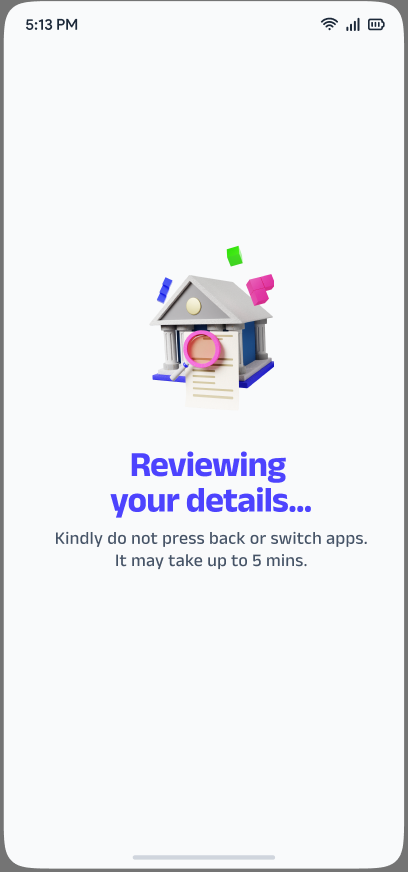
Payment Processing | What does 'Reviewing your details... Kindly do not press back' mean? | After your autopay setup is complete, our system performs a final quality check on your identity, credit limits, and downpayment status. This is the last security step before your order is confirmed and can take up to 5 minutes. Please keep the app open while we finalize your setup. |
What if my payment is in a 'Pending' state? | If a bank network delay occurs, our system will securely wait up to 2 minutes for a final confirmation status from your bank. If it remains pending after this window, the transaction is treated as a failure for safety. If any money was deducted from your account, it will be automatically refunded within 3 to 5 business days. Taggings: L1: splitStore L2: payment pending | |
My payment failed. What should I do? | I understand it’s frustrating to run into a payment failure. Please tap 'Try later' to return to the home page, and check your bank statement. If no money was deducted, you can safely retry your purchase immediately. If your money was deducted, a full refund will be automatically processed within 3 to 5 business days, and your Pay in 3 limit will be fully restored. Taggings: L1: splitStore L2: Payment Failed | |
What does 'Oops! there was some technical issue — Polling expired' mean? | This message appears when our system is unable to fetch a final status from your bank in time due to a network timeout. Tap 'Try again' to return to the checkout screen and retry with a stable internet connection. Rest assured, if any money was deducted during this attempt, it will be automatically refunded within 3 to 5 business days. Taggings: L1: splitStore L2: Payment Pending | |
Limit & Credit | What is my shopping limit? | Your shopping limit is the total NBFC credit extended to you for Pay in 3 purchases on splitStore. Your available limit is the amount currently free to use, calculated as your total limit minus the credit already used by active plans. |
Why has my available limit decreased? | I understand you noticed a drop in your balance. Your available limit decreases when you place a new order (as the credit portion is safely blocked) or following a periodic credit review of your profile. Your limit will naturally go back up as you make your repayments. Taggings: L1: splitStore L2: Credit Limit Decreased | |
How is my limit restored after a purchase? | Your limit is restored in clear stages as you pay: half of the credit portion is freed up after you clear your Month 2 installment, and the remaining half is freed after your Month 3 installment. Using the 'Pay Early' option restores your limit immediately. | |
Can I buy a product that costs more than my total limit? | Yes, absolutely! Thanks to our variable downpayment feature, you can purchase products priced higher than your available limit by simply paying a larger amount upfront (up to approximately 70% of the product price). The remaining two installments are then covered by your credit limit. | |
How do I check my current available limit? | Tracking your balance is simple! Your available and total credit limits are always displayed on your Pay in 3 dashboard within the super.money app. You can also review them on the Checkout page under the Loan Details section before making a purchase. | |
Orders, Tracking & Delivery | My order failed. What happens now? | I understand it’s frustrating to run into an order failure. If no money was deducted, simply tap 'Retry' to return to checkout and try again. If your money was deducted, a full refund is automatically initiated back to your bank account within 3 to 5 business days, and your Pay in 3 limit will be fully restored. Taggings: L1: splitStore L2: Orders Related |
What if the item goes out of stock while my order is being placed? | If an item sells out at the very last second, your transaction will safely stop. If this happens before payment, no money is deducted and you can tap 'Okay, got it' to return home. If it happens after payment, a full refund is automatically triggered and will land in your account within 3 to 5 business days. | |
How do I track my order? | Monitoring your shipment is simple! Just tap on your order inside the Pay in 3 dashboard or the orders section of the super.money app. You will be smoothly redirected to Flipkart's order tracking page to view your live delivery status, estimated arrival, and map updates. | |
My order hasn't arrived. What should I do? | I understand you are eagerly waiting for your package. Because Flipkart completely manages all physical delivery, logistics, and shipping timelines, please check your order tracking page or visit the Flipkart Help section via your order link for the speediest resolution regarding transit delays. Taggings: L1: splitStore L2: Orders Related L3: Order Delayed | |
How do I return or cancel an order? | All cancellations and product returns are handled smoothly directly through Flipkart. From your super.money app, tap on the specific order to be taken straight to the Flipkart order management page, where you can initiate a request and view their product return policies. Taggings: L1: splitStore L2: Orders Related L3: Wants To Return The Order | |
What happens to my Pay in 3 plan when I return an order? | As soon as Flipkart accepts your return, your Pay in 3 plan updates automatically. Your downpayment and any installments you've already paid will be fully refunded to your source bank account within 3 to 5 business days, your future installments will be canceled, and your credit limit will be completely restored. | |
Repayments | When are my Month 2 and Month 3 installments due? | Your installments are conveniently scheduled approximately 30 days apart from your original purchase date. Month 2 is due 30 days after purchase, and Month 3 is due 60 days after purchase. You can always verify your exact due dates on the product page, checkout summary, or your Pay in 3 dashboard, and you can even choose to prepay directly from the splitStore tab in the super.money app. |
How do I pay my installments? | To make things completely stress-free, your installments are automatically deducted via your superUPI Autopay mandate on their exact due dates. No manual action is needed from your side; simply ensure your linked bank account has a sufficient balance. We will always send you a helpful reminder notification 24 to 72 hours before each scheduled deduction. Taggings: L1: splitStore L2: Repayment Issues L3: Unable to Pay Early | |
Can I pay my installments early? | Yes, absolutely! If you want to clear your balances ahead of time, simply head to your Pay in 3 dashboard and tap 'Pay Early' or 'Pay Bill'. Paying early is a great way to manage your budget and instantly restores your available credit limit so you can get back to shopping. | |
What if I want to pay only part of my outstanding amount? | We want to give you maximum flexibility. On the Pay Early screen, you don't have to clear everything at once; you can choose to pay just your next upcoming installment. All available repayment amounts are clearly shown as selectable options on your summary sheet. | |
What happens if my scheduled autopay deduction fails? | If your automatic payment fails due to a network glitch or low balance, we will notify you immediately and typically retry the deduction automatically within 24 hours. To avoid any complications, you can also manually clear the amount anytime using the 'Pay Early' option on your dashboard. Please ensure your linked account is well-funded before each due date. | |
What is the impact of missing a scheduled payment? | We want to help you maintain a great financial profile. Missing your scheduled installment due dates can negatively impact your credit bureau score and may lead to a reduction of your approved credit limit. We strongly recommend keeping your linked account funded or using 'Pay Early' ahead of time if you expect a deduction issue. | |
Refunds | My order placement failed but my downpayment was deducted. Will I get a refund? | Yes, absolutely. Your money is completely safe. A full refund of your downpayment is automatically initiated back to your source bank account, your future installments are canceled, and your credit limit is fully restored. You will receive the funds within 3 to 5 business days. Taggings: L1: splitStore L2: Refunds L3: Order Placement Failed - Refund Awaited |
I returned my order before my Month 2 installment was due. What happens? | Once Flipkart accepts your return, your Pay in 3 plan updates automatically. Your upfront downpayment will be refunded to your source bank account within 3 to 5 business days, your Month 2 and Month 3 installments will be canceled, and your credit limit will be fully restored. Taggings: L1: splitStore L2: Refunds L3: Order Returned - Refund Awaited | |
The item went out of stock after payment. Will I get a refund? | Yes, don't worry. If an item sells out at the last second after your payment is processed, a full refund of all amounts paid is automatically triggered. Your Pay in 3 credit limit will be fully restored, and the money will reach your source bank account within 3 to 5 business days. | |
My order was cancelled. What happens to my loan and refund? | Order cancellations are managed directly by Flipkart. Once Flipkart confirms your cancellation, the exact same refund logic as a return applies: all amounts you've paid are automatically refunded to your bank account, and your credit limit is fully restored within 3 to 5 business days. Taggings: L1: splitStore L2: Refunds L3: Order Cancelled - Refund Awaited | |
How long does a refund take? | Whether it is an order failure, a cancellation, an out-of-stock situation, or a successful product return, all refunds are securely processed and credited back to your account within 3 to 5 business days. | |
Where does my refund go? | For your security, all refunds are credited directly back to the original source bank account you used to make the downpayment through superUPI. Please note that your refund does not go to your super.money wallet. | |
Who handles my refund — super.money or Flipkart? | We handle the financial side of your plan! super.money ensures that your upfront downpayment and any collected installments are safely returned to your bank account, while Flipkart manages the physical return acceptance and product logistics. | |
My limit hasn't been restored after a refund. What should I do? | Your credit limit is designed to automatically refresh within 3 to 5 business days once the refund is completed. If you notice that your available limit has still not been restored after 5 business days, please reach out to super.money support with your order details so we can look into it for you. | |
Technical Issues & Error States | I see 'Oops! there was some technical issue'. What do I do? | I understand it's frustrating to run into an unexpected error. This is a general technical screen that usually clears up quickly. Please check that you have a stable internet connection and tap 'Try again'. If the message persists, simply close and reopen the app, or feel free to reach out to super.money support for assistance. Taggings: L1: splitStore L2: Onboarding Issues L3: Technical Error |
The app is stuck on a loading screen. What should I do? | Certain security and payment checks (like identity verification or bank processing) can naturally take 1 to 5 minutes to complete safely. Please give it a few moments. If it stays stuck beyond 5 minutes, you can safely close and restart the app. Always check your bank statement—if money was deducted without an order confirmation, a full refund will be automatically processed. Please avoid pressing back during active payment screens to prevent transaction drops. Taggings: L1: splitStore L2: Onboarding Issues L3: Technical Error | |
I accidentally pressed back during payment. What happens? | I know it's easy to accidentally hit the back button! To make sure your transaction stays secure, please check your bank account first. If no money was deducted, you can simply head back to the product page and tap 'Buy Now' to try again. If your money was deducted but you don't see an order confirmation, don't worry—a full refund will be automatically initiated back to your account within 3 to 5 business days. | |
Where can I get help for order tracking, returns, and delivery issues? | Because physical shipping, delivery logistics, and product returns are entirely managed by our partner, Flipkart, they can provide the fastest updates. You can easily access Flipkart Help by tapping on your specific purchase inside the super.money app, which will take you directly to your dedicated Flipkart order tracking page. |
Was this article helpful?
That’s Great!
Thank you for your feedback
Sorry! We couldn't be helpful
Thank you for your feedback
Feedback sent
We appreciate your effort and will try to fix the article