1. What is a SuperCard?
The superCard Small Finance Bank Super Card is a co-branded, entry-level credit card in partnership with the super.money app. This card is designed to provide users with cashback on their daily UPI and card transactions, with a primary focus on rewarding spending within the super.money app.
2. What are the key benefits of SuperCard?
On all non-UPI transactions, the card offers 1% cashback.
On all non-UPI spendings on Myntra and Flipkart, the card also offers cashback of 5%, and 2%, respectively.
Offers active-Virtual card from Supermoney app within a few minutes of on-boarding.
PIN generation and UPI set up can be done by the customer from the Supermoney app itself.
3. Is there any joining or annual fee?
The card comes with a zero joining fee.
The card does not charge annual fees.
4. Who is eligible to apply?
The eligible age limit to apply for Utkarsh Bank superCard is 18 years and above.
The applicants should be an Indian resident.
Customers should have a valid PAN along with a mobile number and email ID.
5. How to Apply for Utkarsh Bank superCard?
Customers can apply for the Utkarsh Bank superCard by visiting the super.money application and they must ensure that all their KYC documents are updated.
6. What is the credit limit offered?
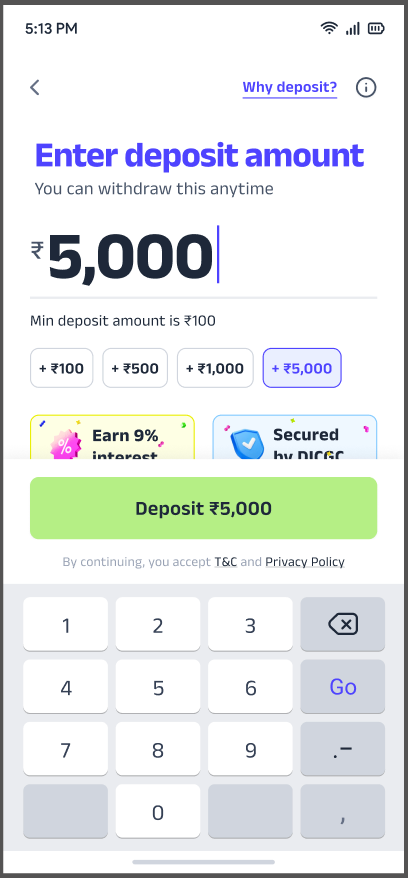
Customers can create a Fixed Deposit(FD) starting from INR 500, and they will get 90% of the FD amount as credit limit.
7. What should customers do if they face issues with the card?
In case customers have any queries or want to raise a complaint, you can reach out to the customer care service of Utkarsh Bank superCard via the following ways:
In-App: Navigate to the Help Center option and raise a ticket.
Email ID: Write an email to securedcc@utkarsh.bank from a registered email address.
Contact Number:
For card blocking: 1800-309-7986
Grievance Redressal: 1800-309-7986 (toll-free), 91-8189043404, and 0542-7109115
8. What are the documents required to complete this application?
No additional documents are required except for Aadhaar and PAN
Application & Eligibility
9. Why do I have to provide consent for my bureau report?
Yes, you must provide consent for your credit bureau report when applying for the Utkarsh Super Card, as the bank needs to verify your identity and assess your creditworthiness. You provide this consent by formally authorizing the bank to access your credit information from bureaus like CIBIL or Experian as part of the application process.
10. Why was my application rejected?
We understand your concern. Applications may sometimes be rejected by the bank based on internal eligibility criteria, verification issues or any issues with your deposit creation.
11. Will applying for this card impact my credit score?
As part of the application process, the bank may conduct a credit inquiry to assess your creditworthiness. The Utkarsh SuperCard is offered by Utkarsh Small Finance Bank, which performs credit checks to assess your creditworthiness before issuing the card.
12. Not getting OTP to submit my application. What can I do?
Please ensure your mobile number is active, has network coverage, and is not in DND. Please try again after a few minutes. If the issue persists, you may reach out to our customer support on help@super.money.
13. My Application is stuck in progress. Unable to move forward.
Once the VKYC is completed and your application is approved, you will get your virtual card instantly. There should be no delay. If you face any issues, you may reach out to our customer support on help@super.money.
Aadhar Verification
14. Why is Aadhaar verification required for this card?
Aadhaar verification or eKYC is mandated by RBI's regulatory guidelines to verify your identity securely for all regulated entities, including Utkarsh Small Finance Bank.
15. Can I use another ID instead of Aadhaar?
Currently, only Aadhaar is allowed for credit card verification. If any alternate ID verifications are allowed in the future, we will let you know.
16. Not getting Aadhaar OTP. What can I do?
Ensure your Aadhaar-linked mobile number is active, has network coverage, and is not in DND. You can retry after a short wait or also visit https://resident.uidai.gov.in to verify your number.
Alternatively, if your linked number is active and the issue persists, you can also contact UIDAI's support team on 1947 (toll-free) or send an email to help@uidai.gov.in for help.
17. Can I complete Aadhaar verification later?
Yes, but your application will remain incomplete until Aadhaar verification is done.
18. My mobile number is not linked to or is different in Aadhaar. Can I still verify?
No, you must use the mobile number linked to your Aadhaar for OTP-based verification as per the regulatory guidelines.
19. My name is different on Aadhaar and PAN. What can I do?
Unfortunately, the application cannot proceed if your name in your PAN card and Aadhaar do not match.
To update the name in your PAN, you can request the same on any of the following websites:
- Protean PAN website,
- UTIITSL website, or
- NSDL e-Gov website
If, instead you want to update the name in your Aadhaar, you can either visit
- the myAadhaar portal, or
- an Aadhaar Enrolment Centre near you
20. Is my Aadhaar information safe with you?
Yes, your data is encrypted and processed in compliance with UIDAI and regulatory standards.
Video KYC
21. I do not have a physical PAN card. Can I still do video KYC?
No. Physical PAN is a requirement to complete Video KYC. You may complete your video KYC later when you have the physical PAN with you.
However, please ensure that you do so within 3 working days of completing Aadhaar Verification or your application may expire. In which case, you will have to start your application all over again.
22. I waited for a video KYC agent for a long time but did not get anyone. What can I do?
We apologize for the experience.
This doesn't happen often. However, we recommend that you retry the video KYC from the app or try again during business hours, i.e. 9 am to 10 pm, for shorter wait times.
23. Can I retry video KYC if I was rejected at first?
Yes, you can initiate the process again from the app as long as your application was not rejected during the process.
24. Will I be rejected if my income is low?
No, as you will be provided SuperCard based on the amount of your Fixed Deposit(FD). However, the bank can decline to issue the Card to you at their sole discretion.
25. How long does it take to get a physical Utkarsh Bank Super Money card to be delivered?
Card delivery usually takes 5–7 working days, once you have requested for a Physical card.
26. How can I track my card delivery?
You’ll receive a tracking link via SMS from the delivery partner once the card is shipped. The SMS is sent on the mobile number registered on super.money.
27. Is there any delivery charge for the physical card?
No, there are no card delivery charges for the physical card.
28. Can I change my delivery address after ordering the card?
Address changes are not supported after dispatch. This is why we re-enforce that you ensure accuracy during application submission.
If your card is delivered on the wrong address, it will be returned and your card delivery will be considered as failed.
29. I haven’t received my card yet. What should I do?
You can write an email to securedcc@utkarsh.bank from your registered email address. Alternatively, you can contact the Bank at 1800-309-7986.
30. Can I use the card digitally before the physical one arrives?
Yes, you can use the digital card until you receive your physical card.
Card Activation & Access
31. How do I activate my card?
Customers will receive an active Virtual card within a few minutes of the onboarding journey from Supermoney app.
From the Supermoney app itself, customers can generate PIN & also set up for UPI.
Click on the ‘Card’ option in the bottom of the super.money app
You will see an option to ‘Link Super Card & Bank to UPI‘. Click on the same.
Follow the options to ‘Set UPI PIN’.
32. Do I need to activate both physical and virtual cards?
No, a virtual card will be activated in the App after the VKYC is completed. Physical Card can be activated in ‘Settings’ Option> ‘Set Your Physical Card PIN’.
33. How do I activate online transactions on my card?
Online transactions can be activated in ‘Settings’ Option> ‘Card Controls’.
Transactions
34. Why was my transaction declined even though I have enough credit?
A transaction may be declined even if you have sufficient credit due to a few common reasons:
1. Card controls: Certain types of transactions (like online, ATM, or international) may be disabled in your app settings.
2. Merchant restrictions: Some merchants may not accept credit cards or may only accept specific card networks.
3. Network or technical issues: Temporary issues with the bank, payment gateway, or merchant can cause failures.
We recommend checking your card controls in the app and retrying after a few minutes.
35. I don’t recognize the charge on my card. How can I dispute it or block my card?
Block your card immediately and raise a dispute via Card Controls on Super Money app, or by contacting Utkarsh Bank's credit card support via their toll-free numbers for help: 1800-309-7986.
36. Can I cancel a transaction made by mistake?
Transactions cannot be reversed once authorized. You may contact the merchant for a refund.
37. My card was debited, but the merchant says the payment failed. What should I do?
The amount will usually auto-reverse within 5–7 working days.
If no refund is received within 5-7 working days, you may contact Utkarsh Bank's credit card support via their toll-free numbers for help: 1800-309-7986
38. I was charged twice for the same transaction. What should I do?
You may raise a dispute via Utkarsh Bank's toll-free numbers: 1800-309-7986
39. Why did my international transaction fail?
Ensure international usage is enabled in your card controls by following below steps:
Card Tab -> Manage card -> Card Controls -> International -> Toggle relevant channel on -> Save changes
Also, make sure that the merchant accepts your card network (JCB or Discover).
40. How do I convert a transaction to EMI?
Currently, your Utkarsh Super Card does not support this option.
Cashbacks
41. How is cashback calculated on my purchases?
To understand how cashback is calculated on the Utkarsh Bank Super Money Credit Card, you can read the product terms and conditions here:
42. When will I receive my cashback?
Your cashback will be credited directly to your ‘Rewards’ section in the super.money App. Just click on ‘Redeem’ to get your rewards credited to your bank account.
44. I returned a product. Will the cashback be reversed too?
Yes, if the original transaction is refunded, associated cashback may be reversed.
45. Is there a cap on cashback earnings?
Yes, there is a cap of ₹500 per statement cycle on cashback earnings. However, this may be subject to change. Please refer to the product terms and conditions for further details:
46. If the user is saying that they didn’t receive the cashback amount in the app?
Your cashback will be credited directly to your super.money app.
If you still haven't received the cashback, please reach out to Utkarsh Small Finance Bank’s toll-free number: 1800-309-7986.
Card Controls
47. Can I temporarily block or pause my card?
Yes, you can by following the steps: Card Tab -> Manage card -> Temporary Block the card.
48. How can I change my card PIN?
You can change your PIN by following any of the below instructions:
Card Tab -> Manage card -> Set UPI PIN.
49. Can I set daily or per-transaction limits on my card?
Yes, you may set daily or per-transaction limits on the card via Card Controls on the Super Money App.
50. How do I enable/disable online, in-store, or ATM transactions?
Log in > Credit Card > Control Center > Online Transactions/ATM Transactions.
51. How do I enable/disable international transactions?
Log in > Credit Card > Control Center > International Transactions/ATM Transactions.
52. Is there a way to receive alerts for every transaction?
Transaction alerts are enabled by default on the email-id provided by you at time of application submission.
Bill Repayments
53. How do I view my credit card statement?
You can view your credit card statement:
1. View the latest statement on Super Money app Card Tab -> Manage Card -> Statements)
54. How can I pay my credit card bill through the app?
You can pay your credit card bill on Super Money app by following the below steps:
Card Tab -> View Bill -> Pay Now
55. What happens if I miss my payment due date?
If you miss your credit card payment due date, a late payment fee may be charged as per the card’s terms and conditions. Additionally, interest will start accruing on the unpaid amount until it is fully cleared.
Missing payments can also negatively impact your credit score, especially if delays continue over multiple billing cycles.
We recommend making at least the minimum payment by the due date to avoid penalties and maintain a healthy credit profile.
56. I paid my bill but it’s not showing as updated. What should I do?
Please wait for a few hours. If it still doesn’t reflect, please raise the concern for the same via Utkarsh Bank's toll-free number: 1800-309-7986.
57. What happens if I only pay the minimum amount due?
If you pay only the minimum amount due on your credit card bill, you will avoid late payment fees. However, interest will be charged on the remaining unpaid balance at the applicable rate.
This means your outstanding amount will continue to grow due to interest charges, and it may take longer and cost more to fully repay your dues.
To avoid paying high interest, it's recommended to clear the full outstanding amount by the due date whenever possible.
58. Can I change the bank account where I receive my Fixed Deposit (FD) withdrawal funds?
Yes, you can.
When you begin the FD withdrawal process on our app or website, you will be prompted to confirm the bank account for the credit. At this step, you will have the option to either:
Select your existing primary bank account.
Choose another bank account that you have already added to your profile.
Add a new bank account to receive the funds.
Please note: For your security, any new bank account added must be in your name, and a simple verification may be required before the transfer is completed.
59. How do I close my Utkarsh SuperCard and withdraw my deposit?
Closing your Utkarsh SuperCard requires two separate steps: first, closing the card, and second, manually withdrawing your Fixed Deposit (FD) amount.
Step 1: Close Your SuperCard
Open the Super.money app.
Click on the Cards section at the bottom of the screen.
Click on "Manage Card" (available just below the card details).
Look for the Question Mark icon (Help/Support) located on the top right section.
Click the Search button and type: "I want to close my card" and select the correct option.
Click "Close my card" and confirm the action.
Step 2: Withdraw Your Deposit
Once your card is successfully closed, you must manually initiate the withdrawal:
Open the Super.money app.
Go to the Cards section at the bottom.
Click on "Manage Card".
Navigate to the "Deposit" section (usually by scrolling in the top bar).
Select the deposit you wish to withdraw and click the "Withdraw" option.
Refund Timeline: It will take 3–5 working days (excluding weekends and bank holidays) for the deposit amount to reflect in your bank account.
Q: I paid my Utkarsh SuperCard bill using a third-party app (like PhonePe, Paytm, or CRED), but the status isn't updating. Where is my payment?
A: The status of your payment depends on how you initiated the transaction:
1. Supported Method (Bill payment started on super.money App):
If you opened the super.money app, went to “superCard” section and clicked on "Pay Bill," and then selected a UPI app (like PhonePe/Paytm) to complete the transaction and came back to super.money app, where you saw payment successful message. This is a valid payment. Your bill status should update shortly.
However, if you do not see the message of payment successful on super.money app. It is possible that you interrupted the transaction or the transaction did not complete due to low network connectivity. If Utkarsh small finance bank has not received the money, the paid amount will be refunded back to your source bank account within 3-5 working days. We suggest you make the bill payment again to ensure no pending dues.
2. Unsupported Method (Bill payment done directly via Third-Party App, where you didn’t start the bill payment by opening super.money app):
If you opened a third-party app such as CRED, Paytm, PhonePe, CheQ directly and manually entered your 16 digit Utkarsh SuperCard details to pay the bill, please note that this kind of bill payment is not supported by Utkarsh small finance bank for Utkarsh superCards.
Result: This payment will not reflect in your Utkarsh superCard.
Refund: If the money was debited from your source account, the order will eventually be marked as failed. You will receive a full refund to your source account within 2-3 working days from the third-party app. However, this won’t be treated as a payment attempt by the Utkarsh bank and you should make your payment within the due date to ensure no additional interest or penalties are levied.
For any queries, we suggest you to please contact the third-party app where you made the payment.
Safe Payment Method
To ensure your Utkarsh superCard bill payment is processed successfully, always initiate the payment directly from the super.money app or use the secure payment link sent via SMS.
Payments made outside these channels may fail or not be recorded correctly.
Grace Period for Payments
The standard due date for Utkarsh superCard bills is the 15th of every month.
You are provided with a 3‑day grace period after the due date to make your payment without incurring late charges.
Important Note on Credit Reporting
Even though no late fee is applied during the grace period, banks may still report delayed payments to credit bureaus.
This could potentially affect your credit score if payments are not made on or before the due date.
Card Fee (on applying for a physical card):
Links to Utkarsh Bank T&Cs:
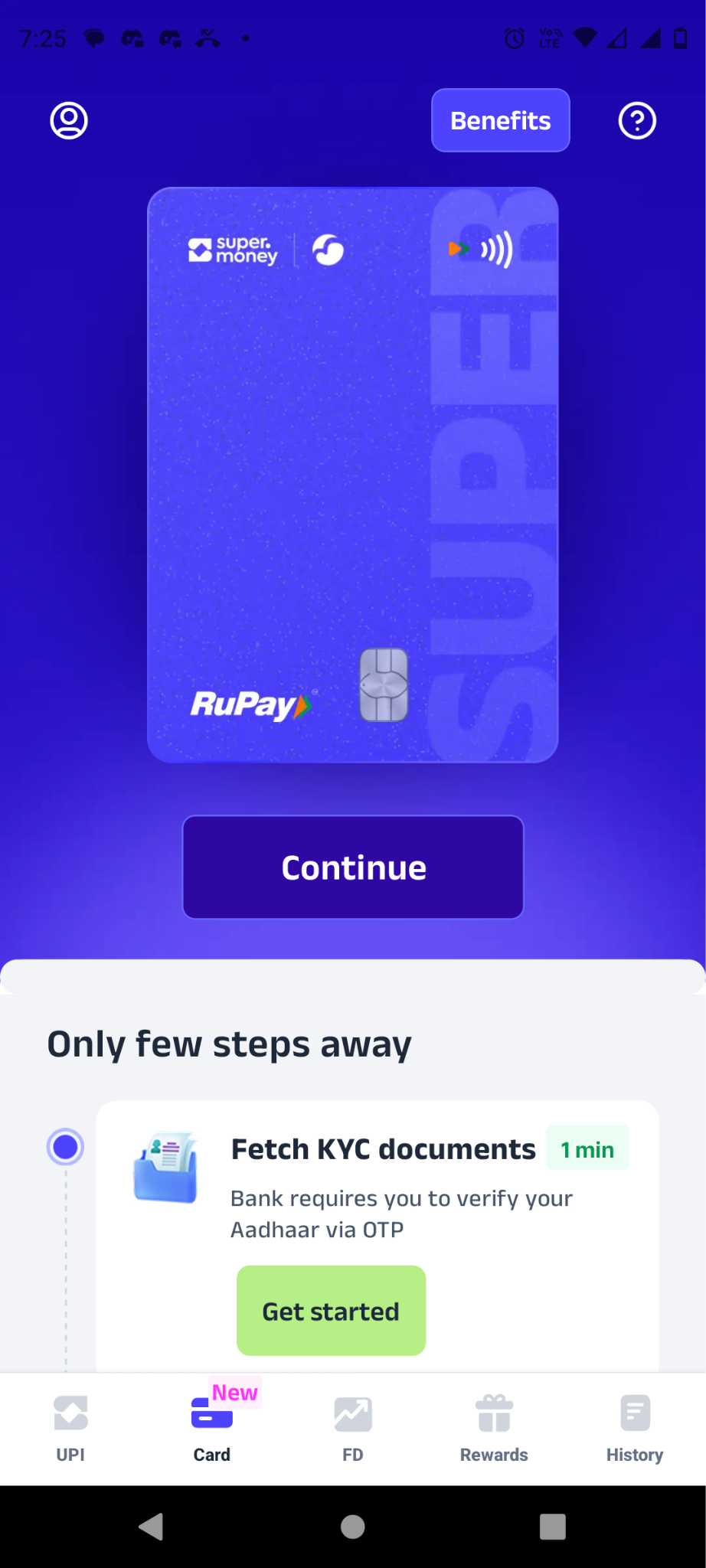
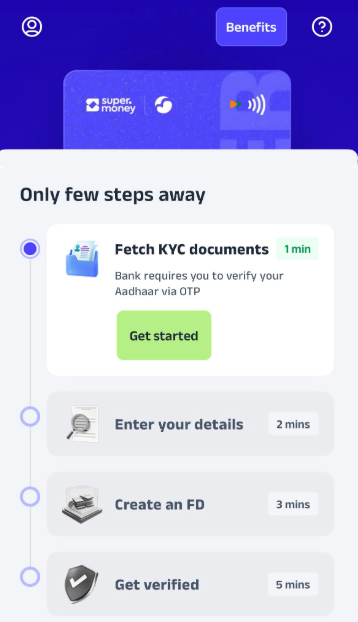
Utkarsh SuperCard Home Screen and Onboarding Flow
Home Screen: Onboarding Flow:
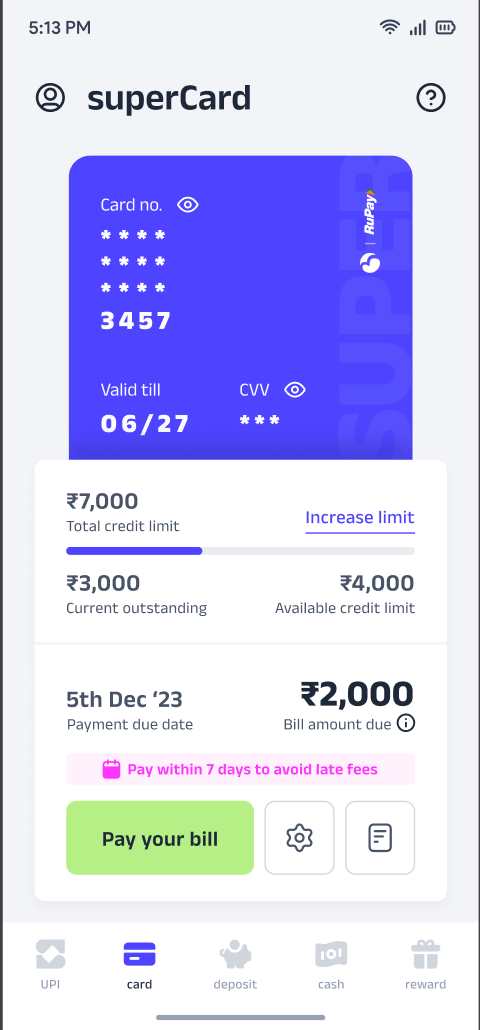
FD Creation Screen: Card Details Screen:
Fees and Charges
The fees and charges applicable on Utkarsh Bank superCard are given in the table below:
Note:
The interest-free period of up to 45 days.
Cash withdrawal limit is up to 20%.
Was this article helpful?
That’s Great!
Thank you for your feedback
Sorry! We couldn't be helpful
Thank you for your feedback
Feedback sent
We appreciate your effort and will try to fix the article