Customer Support SOPs for
Axis Bank Super Money Credit Card
(superCard Pro)
Support Channels
There will primarily be five channels of customer support for the customer:
Super Money FAQsnu
The FAQs can be accessed in the following ways on Super Money app:
UPI Tab -> Profile Section -> Tap “Help & Feedback” -> Select “superCard”
Card Tab -> Tap “Help” icon on top right -> Directly lands on superCard FAQs
Super Money E-mail
Customers may reach out on help@super.money, as they do today for Utkarsh Bank Super Money Credit Card.
Super Money Social Media Handles
These may include handles across LinkedIn, Play store, Twitter, Facebook, among others.
Axis Bank Phone Banking
Toll-Free Numbers:
1800 209 5577
1800 103 5577
Charges Applicable Numbers:
1860 419 5555
1860 500 5555
International Number:
+91 22 6798 7700 (for customers outside India)
You can call these numbers for various credit card services, including: Regenerating Card PIN, Blocking lost cards, Email statement, Disputing a transaction, EMI services, etc.
Axis Bank Mobile Banking App
Customers can download the Axis Mobile Banking app and login using their credit card credentials to access customer support servicesC
FAQs & SOPs
This section will contain category-wise FAQs & SOPs for our agents’ reference. The same will also be made available in the app under “Help & Feedback > superCard”.
New SOP additions
I closed my Utkarsh Card. How do I access superCard Pro now?
Unfortunately, since the superCard Pro is currently being rolled out to a limited number of users, we kindly request you to wait a little longer. We’ll be sure to notify you as soon as you become eligible to apply.
Also, please note that the status of your Utkarsh SuperMoney Credit Card — whether active or closed — does not impact your eligibility for the superCard Pro. The eligibility is based on Axis Bank’s internal criteria, independent of your FD-backed card status.
We appreciate your patience and look forward to bringing you on board soon!
How do I change my address on the review page? Unable to edit. (only applicable for existing Axis Bank Credit Card customers)
Since you’re an existing Axis Bank credit card holder, the bank fetches your delivery address from your previous credit card application KYC during the Axis Bank Supermoney Credit Card application process.
Unfortunately, as per current policy, the bank does not allow this address to be changed within the same application.
We understand this may be inconvenient and appreciate your understanding. Let us know if you need help with anything else!
Facing issue with PAN
Dear User,
Thank you for your patience, and we sincerely regret the delay in getting back to you.
We’re sorry to inform you that we are currently unable to offer the Super.money Axis Bank credit card for the PAN and mobile number you have shared. This decision is based on eligibility criteria determined by Axis Bank, which is not shared with us.
We truly appreciate your understanding in this matter and look forward to serving you with other products and offers in the future.
Best regards,
Team super.money
Not able to apply for superCard Pro (customer has ongoing Utkarsh application or an Utkarsh card issued)
superCard Pro is currently being rolled out to a limited group of users only.
We're happy to share that it will be made available to Utkarsh Card holders like you very soon. We request you to please wait a little longer while we work to bring it to you as quickly as possible.
I want to discard my Utkarsh application and go to superCard Pro application
Unfortunately, the superCard Pro is currently being rolled out to a limited number of users. We kindly request you to wait a little longer.
I got a WhatsApp message that I am pre-approved for superCard Pro, but I am seeing superCard application only
We apologize for the miscommunication regarding the SuperCard Pro. The card is currently being rolled out to a limited number of users and is not yet available for general application. Thank you for your understanding.
I am an existing Axis Credit Card holder, but was not allocated the same.
We understand your interest in the card. While some existing Axis Bank credit card holders may be receiving offers, please note that Axis Bank reserves the right to selectively extend offers to its customers based on internal criteria.
At the moment, we notice that Axis Bank does not have a specific offer available for your profile. Since the offer does not exist for you currently, there is no application number generated.
Let us know if you have any other questions — we’re happy to assist!
Why was my application rejected? I have good credit score
We understand your concern. Applications may sometimes be rejected by the bank based on internal eligibility criteria, verification issues, or results from credit checks — even if your credit score is good.
But don’t worry — you can reapply after 3 to 6 months, depending on the bank’s policies.
In the meantime, you can consider applying for the Utkarsh Bank SuperMoney Credit Card. It’s an FD-backed card and comes with *100% approval chances (subject to basic checks), making it a great alternative to start building your credit profile further.
Let us know if you need help applying!
Re-evaluate me for superCard Pro. My score has changed.
We understand your concern regarding the Axis Bank Supermoney RuPay Credit Card application and the mix-up. Please be assured, the allocation of the FD-backed credit card in your case was not solely based on credit score. There are additional internal criteria used by both Axis Bank and Super.money that determine card eligibility, beyond just your CIBIL score.
Please also note that the Axis Bank Supermoney RuPay Credit Card is currently offered to limited
. While your score may be excellent, eligibility is determined through a combination of factors.
We will automatically re-evaluate your profile in the next 3–6 months and notify you as soon as you become eligible to apply for the same. No further action is required from your end at the moment.
In the meantime, you can consider applying for the Utkarsh Bank SuperMoney Credit Card. It’s an FD-backed card and comes with *100% approval chances (subject to basic checks), making it a great alternative.
Thank you again for your patience and understanding. Please feel free to reach out if you need any further help.
Application stuck in-progress. Unable to move forward.
Sorry to hear your application is stuck — we understand this can be frustrating.
Typically, application statuses are updated the same day, but in rare cases, it can take up to 5–7 days. We're following up with the bank and will notify you as soon as we receive an update.
Thank you for your patience, and apologies again for the delay.
I mistakenly entered something in the PAN field. I want to edit it.
Unfortunately, once the PAN is submitted, our banking partner does not allow any changes to the information entered. This is why we encourage customers to carefully review all details before submission.
I mistakenly entered something in <field-name>. I want to edit it.
Once a card application is submitted, our banking partner does not allow any changes to the information entered, including the <field-name>. This is why we encourage customers to carefully review all details before submission.
If you haven’t submitted your application yet, you’ll have the option to edit your information on the final review page before completing the process.
Hope this helps! If there’s anything else we can assist you with, please feel free to reach out.
Can I change my official email? Not receiving OTP on official email for verification
Unfortunately, email aliases are not accepted for verification purposes by our partner bank.
Regarding the OTP, if you’re not receiving it, it’s possible that your company’s IT team may be blocking the email. Please do check your spam or junk folder, and if it’s not there, we recommend getting in touch with your IT team to ensure that emails from our partner are not being filtered or blocked.
Let us know once you’ve had a chance to check, or if there’s anything else we can assist you with.
OTP Issues for review application error
Dear User,
Thank you for staying connected with us!
Sorry for the inconvenience. This seems to be due to an issue with the business name entered — we’ve noticed there may be extra spaces at the beginning or end.
Please edit the name to remove any such spaces and resubmit your application. It should go through fine now. If you still face any issues, let us know and we’ll help you out.
We appreciate your patience and understanding in this regard
Regards,
super.money Support Team
Users want to view card details in the app but otp is not coming
Ask for phone number if user didn’t provide previously
Dear User,
Apologies for the inconvenience caused to you!
Could you please provide us with your registered phone number to assist you further
Awaiting your response.
Regards,
super.money Support Team
Response:
Dear User,
Thank you for staying connected with us!
This is not the experience we want you to have with super.money. I am escalating this issue to the relevant team for review and resolution, we will keep you posted on the same.
We appreciate your patience and understanding in this regard.
Regards,
super.money Support Team
Something went wrong error
Response:
Dear User,
Apologies for the inconvenience caused to you!
We kindly request you to try again after 24 hrs to resolve the issue.
We appreciate your patience and understanding in this regard
Regards,
super.money support Team
If user comes back after 24 hrs, ask for phone number and then escalate
Response :
Dear User,
Thank you for staying connected with us!
This is not the experience we want you to have with super.money. I am escalating this issue to the relevant team for review and resolution, we will keep you posted on the same.
We appreciate your patience and understanding in this regard.
Regards,
super.money Support Team
3: Application Stuck in Progress
Initial Response :
Dear User,
Thank you for reaching out to us!
Sorry to hear your application is stuck, we understand this can be frustrating.
Typically, application statuses are updated the same day, but in rare cases, it can take up to 5–7 days.
We appreciate your patience during this time.
Regards,
super.money Support Team
Follow-up Response (if user contacts after 7 working days):
Here's the process to follow:
1.Request Information: Ask the user for the registered phone number.
2.Retrieve SM ID: Use the retrieved phone number and filter the column "Account ID" in this metabase query and get the SM ID.
3.Check Metabase: With the retrieved SM ID, filter the column "User Account ID" column in the axis metabase query
If details are visible in Metabase:
Dear User,
Thank you for staying connected with us!
We kindly request you to please refresh the app and check the card section. You should now be able to see the details.
Feel free to reach out to us for any further queries or concerns, we’d be happy to help you.
Thank you for your kind understanding.
Regards,
super.money Support Team
If details are NOT visible in Metabase:
Raise a child ticket and tag product manager as "Prince"
Tagging :
L1:Card - Axis
L2 : Application Issues
L3: Axis application in progress, app not refreshing
4: Card Details Not Visible in Application Even After Receiving Physical Card
1.Request Information: Ask the user for the registered phone number.
2.Retrieve SM ID: Use the retrieved phone number and filter the column "Account ID" in this metabase query and get the SM ID.
3.Check Metabase: With the retrieved SM ID, filter the column "User Account ID" column in the axis metabase query
If the details are visible in Metabase:
Dear User,
Thank you for staying connected with us!
We kindly request you to please refresh the app and check the card section. You should now be able to see the details.
Feel free to reach out to us for any further queries or concerns, we’d be happy to help you.
Thank you for your kind understanding.
Regards,
super.money Support Team
If the details are NOT visible in Metabase:
Raise a child ticket and tag product manager as "Prince"
Tagging:
L1:Card - Axis
L2 : Application Issues
L3: Axis application in progress, app not refreshing
Note: When creating the child ticket, ensure you collect the phone number and an error screenshot/screen recording from the user.
Character Limits error in axis bank application
Response:
Dear User,
Thank you for staying connected with us!
We request you to please retry submitting your name, making sure to follow these guidelines:
The name must contain a minimum of 2 words and a maximum of 3 words
At least one word should have 2 or more characters
No special characters or numbers are allowed
The total length, including spaces, should not exceed 19 characters
The name should not begin or end with spaces
Please note, this will not impact your eligibility, as the full name will still be matched from the PAN details provided by you. The name you enter here is only for display on the card.
Let us know if you face any issues—we’re happy to help!
Regards,
super.money Support Team
Link Card to the UPI
you can link your Axis Bank Super.money credit card to the app for UPI transactions and continue enjoying all associated benefits. Please follow the steps below:
Open the super.money app and go to the Profile section
Under Linked Accounts, tap on Add payment method
Choose Rupay Credit Card
Select Axis Bank and link your card
Once linked, you'll be able to use the card for eligible UPI payments
General Enquiries
What are the benefits of using superCard?
All of our superCard variants are lifetime free — no joining or annual fees.
They also offer best-in-class cashbacks (3-5% flat cashbacks), work seamlessly with UPI, and come in a premium, sleek design you’ll love to carry.
Do I have to pay any fee for superCard?
No, both variants of superCard are completely free for life — there are no hidden charges, joining fees, or annual fees.
superCard Invite (NOT LIVE)
Why do I have to request an invite for superCard?
We’re using an invite system to make sure early users of superCard get the best possible experience.
This helps us roll out benefits smoothly, offer faster approvals, and support each customer better as we grow.
How do I request an invite for superCard?
You can request an invite directly from the app. Just follow the below steps:
Card Tab -> tap “Request Invite” -> click "Request" on any of the contacts -> Send request on WhatsApp
Once your friend or family member sees the request, they can approve you in two clicks by clicking on the link!
My request was approved, but I am still not able to apply.
There might be a short delay while your eligibility is being rechecked. Please try again after some time or reach out to help@super.money if the issue continues.
I don't want to request an invite from my contacts. How do I still apply for the superCard?
Unfortunately, that would not be possible. Access to superCard is limited to only a select few at the moment. To become part of that exclusive club, it is mandatory that you first request an invite.
The more requests you send, the better your chances of getting early access. So, hurry up!
Unable to Apply
Why do I have to provide consent for my Experian bureau report?
Your credit report helps us understand your repayment history and credit profile, ensuring that we offer you a card that matches your financial standing.
Your data is handled securely and in full compliance with applicable regulations. We do not access your report without your explicit permission, and your information is never shared without your consent.
Further, the bureau report accessed by Super Money (Scapic Innovations Pvt Ltd) does not impact your credit score, as we only perform a soft inquiry.
I don't have any monthly income yet. Why can't I apply for a superCard?
For a credit card application, having a regular income is required to meet basic eligibility and repayment criteria of the banks.
Don't worry, you can re-apply at a later date.
I am less than 18 years old. Why can't I apply for a superCard?
superCard is only available to individuals aged 18 and above, as per regulatory guidelines for issuing credit cards.
I have an Utkarsh card or Utkarsh application ongoing. How can I apply for superCard Pro?
superCard Pro is currently being rolled out to a limited number of users to ensure we deliver the best possible experience to users initially.
We're happy to share that it will be made available to Utkarsh Card holders like you very soon. We request you to please wait a little longer while we work to bring it to you as quickly as possible.
Thank you for your patience and continued support!
Application & Eligibility
Why was my application rejected?
We understand your concern. Applications may sometimes be rejected by the bank based on internal eligibility criteria, verification issues, or results from credit checks — even if your credit score is good.
But don’t worry — you can reapply after 3 to 6 months, depending on the bank’s policies. We’ll make sure to notify you as soon as you’re eligible to apply again.
In the meantime, you can consider applying for the Utkarsh Bank SuperMoney Credit Card. It’s an FD-backed card and comes with *100% approval chances (subject to basic checks), making it a great alternative to start building your credit profile further.
Let us know if you need help applying!
Will applying for this card impact my credit score?
As part of the application process, the bank may conduct a credit inquiry to assess your creditworthiness. This could be a soft inquiry, which does not affect your credit score, or a hard inquiry, which may have a minor and temporary impact on your score.
The type of inquiry depends on the stage of your application and the requirements of our banking partner. Rest assured, credit inquiries are standard practice and help ensure responsible credit card lending.
Not getting OTP to submit my application. What can I do?
Please ensure your mobile number is active, has network coverage, and is not in DND. Please try again after a few minutes. If the issue persists, you may reach out to our customer support on help@super.money.
Application eligibility check is taking too long. What can I do?
It may be taking some time for us to verify your status with the bank. Please try again after a short while. In most cases, the status updates automatically. In rare situations, it may take up to 6 hours or slightly longer.
Where can I view the product terms & conditions?
You can view the Axis Bank Super Money RuPay Credit Card product terms and conditions here: Cashback Terms & Conditions – AXIS BANK SUPERMONEY RuPay CREDIT CARD
Where can I learn about card fees & charges, withdrawal limits, billing, etc.?
You can learn more about the Axis Bank Super Money RuPay Credit Card fees & charges, withdrawal limits, billing, etc. here:
https://www.axisbank.com/docs/default-source/default-document-library/sosc-credit-cards.pdf
Aadhaar Verification
Why is Aadhaar verification required for this card?
Aadhaar verification or eKYC is mandated by RBI's regulatory guidelines to verify your identity securely for all regulated entities, including Axis Bank.
Can I use another ID instead of Aadhaar?
Currently, only Aadhaar is allowed for credit card verification. If any alternate ID verifications are allowed in the future, we will let you know.
Not getting Aadhaar OTP. What can I do?
Ensure your Aadhaar-linked mobile number is active, has network coverage, and is not in DND. You can retry after a short wait or also visit https://resident.uidai.gov.in to verify your number.
Alternatively, if your linked number is active and the issue persists, you can also contact UIDAI's support team on 1947 (toll-free) or send an email to help@uidai.gov.in for help.
Can I complete Aadhaar verification later?
Yes, but your application will remain incomplete until Aadhaar verification is done.
My mobile number is not linked to or is different in Aadhaar. Can I still verify?
No, you must use the mobile number linked to your Aadhaar for OTP-based verification as per the regulatory guidelines.
Please ensure the mobile number on your super.money account is the same as your Aadhaar-registered number. Alternatively, you can update the mobile number linked to Aadhaar by visiting an Aadhaar enrolment centre.
My name is different on Aadhaar and PAN. What can I do?
Unfortunately, the application cannot proceed if your name in your PAN card and Aadhaar do not match.
To update the name in your PAN, you can request the same on any of the following websites:
- Protean PAN website,
- UTIITSL website, or
- NSDL e-Gov website
If instead you want to update the name in your Aadhaar, you can either visit
- the myAadhaar portal, or
- an Aadhaar Enrolment Centre near you
Is my Aadhaar information safe with you?
Yes, your data is encrypted and processed in compliance with UIDAI and regulatory standards.
Video KYC
I do not have a physical PAN card. Can I still do video KYC?
No. Physical PAN is a requirement to complete Video KYC. You may complete your video KYC later when you have the physical PAN with you.
However, please ensure that you do so within 72 hours of completing Aadhaar Verification or your application may expire. In which case, you will have to start your application all over again.
I waited for a video KYC agent for a long time but did not get anyone. What can I do?
We apologize for the experience.
This doesn't happen often. However, we recommend that you retry the video KYC from the app or try again during business hours, i.e. 9 am to 5 pm, for shorter wait times.
I am facing audio or video issues. What can I do?
Ensure your camera/microphone permissions are enabled and your internet connection is stable.
Retry the KYC if needed. If you continue to face the issue, please shift to a better network area or get your camera and microphone features checked and try again.
Can I retry video KYC if I was rejected at first?
Yes, you can initiate the process again from the app as long as your application was not rejected during the process.
Physical Verification
Why did my application move to physical verification?
Going forward, the user can see the application id in the tab section. Please refer to the below screenshot for better understanding
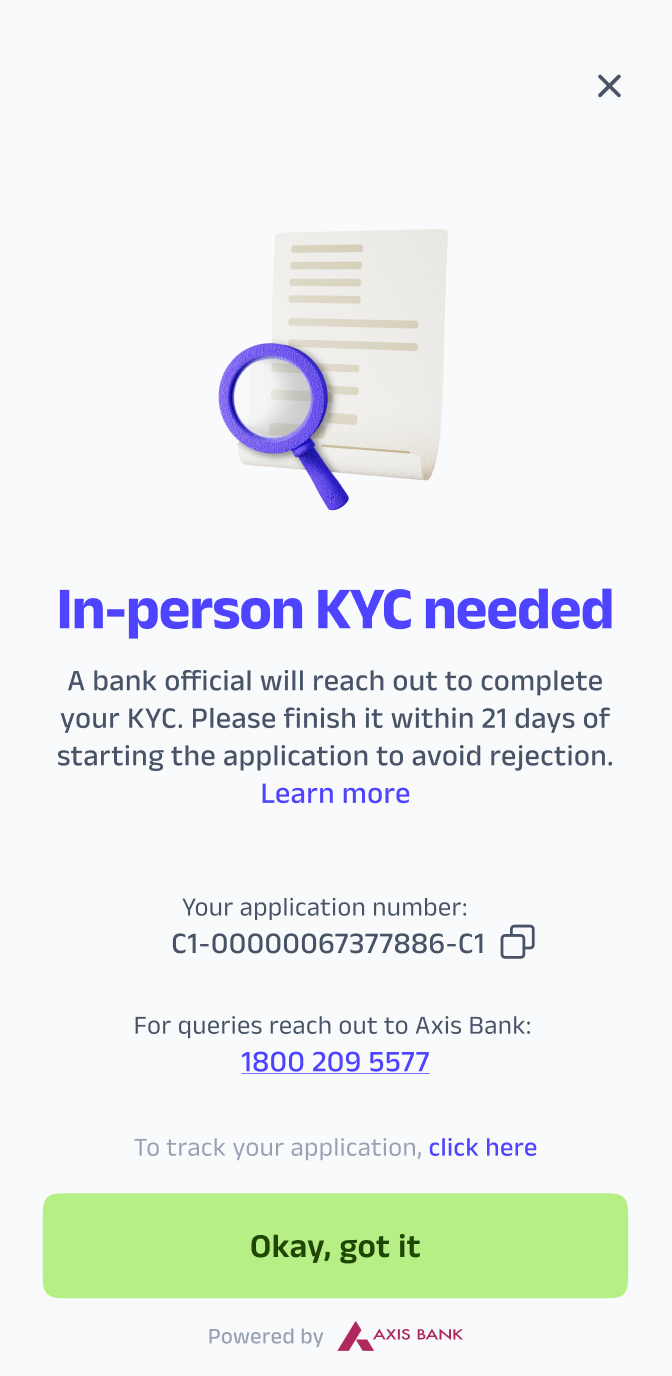
Response :
Dear User,
Thank you for staying connected with us!
Your application may be directed to physical verification if additional verification is required, as per Axis Bank’s discretion. This is a standard process in certain cases.
If no one from the bank has contacted you yet or if you are facing any issues with physical verification, we request you to reach out to Axis Bank’s toll-free numbers: 1800-209-5577, or 1800-103-5577.
Please keep your application ID which is available in the card section handy when you call.
Let us know if you need help with anything else!
What documents do I need to show during the visit?
You’ll need a government-issued ID (PAN) and proof of address (Aadhaar). Further instructions will be shared prior to the visit by the agent.
Can I do physical KYC at a nearby center instead of at home?
Currently, the verification is done only at the addresses provided by you. Center visits are not supported at this time.
How long does the physical KYC process take?
The visit typically takes 5–10 minutes of your time. Verification completion may take up to 2 working days after the visit.
I missed my KYC appointment. How can I reschedule?
Don't worry, you can always reschedule the KYC appointment.
Your KYC agent will contact you within the next 3-5 days of your previous appointment to reschedule.
My address has changed. How do I update it for physical KYC?
Unfortunately, once the application is submitted and moved to KYC, the address cannot be updated at our end.
If there is a change in address, we recommend that you communicate the same to the KYC agent, and allow them to help you further in completing the process.
Income Verification
Will I be rejected if my income is low?
Eligibility is based on multiple factors. A low income alone may not result in rejection.
Does income verification affect my credit limit?
Your approved credit limit is influenced by several factors. While your income plays a key role, other aspects such as your credit history, repayment behavior, and internal risk checks also contribute to the final limit.
My income verification failed. What should I do?
You can re-upload valid documents or choose another income verification method in the app by reinitiating the process.
Will you share my income details with third parties?
No, your income data is kept confidential and used only for verification as per regulatory norms.
Card Delivery
How long does it take to get a physical Axis Bank Super Money card to be delivered?
Card delivery usually takes 3–7 working days after your application is successfully completed.
How can I track my card delivery?
You’ll receive a tracking link via SMS from the delivery partner once the card is shipped. The SMS is sent on the mobile number registered on super.money.
Is there any delivery charge for the physical card?
No, there are no card delivery charges for the physical card.
Can I change my delivery address after ordering the card?
Address changes are not supported after dispatch. This is why we re-enforce that you ensure accuracy during application submission.
If your card is delivered on the wrong address, it will be returned back and your card delivery will be considered as failed.
I haven’t received my card yet. What should I do?
You should have received a tracking link via SMS from the delivery partner once the card was shipped. Please check the status on the tracking link.
Alternatively, if you are not able to track, you may contact Axis Bank via their toll-free numbers: 1800-209-5577, 1800-103-5577.
Can I use the card digitally before the physical one arrives?
No, presently the bank policies restrict usage of card until the physical card is delivered and verified.
Card Activation & Access
How do I activate my card?
You can activate your card in the app by doing any of following actions:
1. Linking your card to UPI
2. Enable e-com transactions on your card
3. Setting your Physical card PIN
For each of these actions, you will be required to enter the delivery code received with your card welcome kit.
Do I need to activate both physical and virtual cards?
Yes, separate activations are required.
Virtual card is required to be activated by entering delivery code received with your card welcome kit on Super Money app, while the physical card is required to be activated by setting the card PIN on Axis Mobile Banking app.
Unable to view card details since it is asking for delivery code. What should I do?
You will receive the delivery code in the welcome letter of your physical card kit. Please carefully enter the same code to unlock full access.
How do I set the physical card PIN?
You can set your PIN by following any of the below instructions:
1. On your Axis Mobile Banking app or Axis Internet Banking
Log in > Credit Card > Control Center > Set PIN
2. Visit any Axis ATM and select 'Change PIN'
3. Call customer care on 1860-419-5555 / 1860-500-5555
How do I activate UPI on my card?
You can activate super.money UPI or any other UPI on the card in 3 simple steps:
1. Click on "Link superCard to UPI" on super.money app > Card tab, or select option to link RuPay Credit Card on any other UPI app
2. Enter last 6 card digits & expiry, and click on create PIN
3. OTP will be sent to your registered number. Enter OTP and set PIN.
How do I activate online transactions on my card?
You can enable online transactions from the Card Controls section in the app. You can also follow the directions below:
Card Tab -> Manage card -> Card Controls -> Toggle "Online Shopping" on -> Save changes in super.money app and Axis Bank App.
My UPI transactions are failing. What do I do?
You can enable online transactions in super.money app. But you cannot enable the UPI option in super.money. You have to download the Axis Bank Open App, link your card, and enable the UPI toggle option to make transactions.
I failed to activate my card, and it was automatically closed. What should I do?
As per regulatory guidelines, if the card is not activated within 36 days of issuance, the bank is required to automatically close the card on the 37th day.
If your card is closed, you may contact Axis Bank's credit card support via their toll-free numbers to understand the next steps: 1800-209-5577, 1800-103-5577.
Transactions
Why was my transaction declined even though I have enough credit?
A transaction may be declined even if you have sufficient credit due to a few common reasons:
1. Card controls: Certain types of transactions (like online, ATM, or international) may be disabled in your app settings.
2. Merchant restrictions: Some merchants may not accept credit cards or may only accept specific card networks.
3. Network or technical issues: Temporary issues with the bank, payment gateway, or merchant can cause failures.
We recommend checking your card controls in the app and retrying after a few minutes. If the issue persists, please contact Axis Bank's credit card support via their toll-free numbers for help: 1800-209-5577, 1800-103-5577.
I don’t recognize a charge on my card. How can I dispute it or block my card?
Block your card immediately and raise a dispute via Card Controls on Super Money app, or by contacting Axis Bank's credit card support via their toll-free numbers for help: 1800-209-5577, 1800-103-5577.
Can I cancel a transaction made by mistake?
Transactions cannot be reversed once authorized. You may contact the merchant for a refund.
My card was debited but the merchant says the payment failed. What should I do?
The amount will usually auto-reverse within 5–7 days.
If no refund is received within 5-7 days, you may contact Axis Bank's credit card support via their toll-free numbers for help: 1800-209-5577, 1800-103-5577.
I was charged twice for the same transaction. What should I do?
You may raise a dispute via Axis Bank's toll-free numbers: 1800-209-5577, 1800-103-5577.
Why did my international transaction fail?
Ensure international usage is enabled in your card controls by following below steps:
Card Tab -> Manage card -> Card Controls -> International -> Toggle relevant channel on -> Save changes
Also, make sure that the merchant accepts your card network (JCB or Discover).
How do I convert a transaction to EMI?
Go to the transaction in the app and choose the “Convert to EMI” option. The option will only be visible if the transaction is eligible for EMI conversion, i.e. the transaction must be above ₹2,500 and performed at an EMI-eligible merchant.
How do I foreclose an EMI previously done on a transaction?
You may foreclose an EMI by calling any of the Axis Bank's toll-free numbers: 1800-209-5577, 1800-103-5577.
Cashbacks
100% cashback lauch offer(01 june - 30 june)
To check whether user is eligible for cashback or not you need to get the SM ID by using registered phone number and filter it in this LINK
Cashback will be credited to the user's super.money rewards tab within 7 business days if the details are visible.
If the user didn’t receive the cashback ask the user to check their rewards tab and alternatively the agent can check these details in the wallet transaction table.
How is cashback calculated on my purchases?
To understand how cashback is calculated on Axis Bank Super Money Credit Card, you can read the product terms and conditions here: https://www.axisbank.com/docs/default-source/default-document-library/credit-cards/axis-bank-supermoney-rupay-credit-card.pdf
When will I receive my cashback?
Your cashback will be credited directly to your credit card statement at the end of the next billing cycle, i.e. if your transaction was made on 1-June, and the statement is generated every 15th of the month, the cashback for the transaction will be credited in the 15-July statement.
Where can I check my earned cashback?
You can view cashback earned over the last 6 months on your card with 3 steps on the Super Money app: Card Tab -> View Cashbacks -> OTP.
However, do note that, for transactions in the current cycle, the cashbacks will only be reflected once the statement is generated for the subsequent cycle.
Alternatively, for each statement cycle, you will get the aggregate cashback view within the card statement. Once your card statement is generated, it is automatically delivered to your personal email.
I returned a product. Will the cashback be reversed too?
Yes, if the original transaction is refunded, associated cashback may be reversed. Please refer to the product terms and conditions here: https://www.axisbank.com/docs/default-source/default-document-library/credit-cards/axis-bank-supermoney-rupay-credit-card.pdf
Is there a cap on cashback earnings?
Yes, there is a cap of ₹500 per statement cycle on cashback earnings. However, this may be subject to change. Please refer to the product terms and conditions for further details: https://www.axisbank.com/docs/default-source/default-document-library/credit-cards/axis-bank-supermoney-rupay-credit-card.pdf
If the user is saying that they didn’t receive the cashback amount in the statement?
Your cashback will be credited directly to your credit card statement at the end of the next billing cycle, i.e. if your transaction was made on 1-June, and the statement is generated every 15th of the month, the cashback for the transaction will be credited in the 15-July statement
If you still haven't received the cashback, please reach out to Axis Bank’s toll-free numbers: 1800-209-5577, or 1800-103-5577.
Card Controls
I am unable to access card controls since I don't have a delivery code. What should I do?
You will receive the delivery code in the welcome letter of your physical card kit. You must carefully enter the same code to unlock full access to card controls.
Can I temporarily block or pause my card?
No, the option to temporarily freeze or unfreeze your card is currently not available. We're working on bringing more control features soon.
How can I change my card PIN?
You can change your PIN by following any of the below instructions:
1. On your Axis Mobile Banking app or Axis Internet Banking
Log in > Credit Card > Control Center > Change PIN
2. Visit any Axis ATM and select 'Change PIN'
3. Call customer care on 1860-419-5555 / 1860-500-5555
Can I set daily or per-transaction limits on my card?
Yes, you may set daily or per-transaction limits on the card via Card Controls on the Axis Mobile Banking application.
We're working on bringing the control features on the Super Money app as well in the future for your card. Stay tuned.
How do I enable/disable online, in-store, or ATM transactions?
You can enable/disable online, in-store, or ATM transactions from the Card Controls section in the app by following the below directions:
Card Tab -> Manage card -> Card Controls -> Toggle relevant option ON or OFF -> Save changes
How do I enable/disable international transactions?
You can enable/disable international usage from the Card Controls section in the app by following the below directions:
Card Tab -> Manage card -> Card Controls -> International -> Toggle any channel ON/OFF -> Save changes
Is there a way to receive alerts for every transaction?
Transaction alerts are enabled by default on the email-id provided by you at time of application submission.
If you wish to change the email-id for your credit card, please raise a request for the same via Axis Bank's toll-free numbers: 1800-209-5577, 1800-103-5577.
User is facing issues with the
Bill Repayments
How do I view my credit card statement?
You can view your credit card statement in multiple ways:
1. View the latest statement on Super Money app (Card Tab -> View Bill -> 'i' icon)
2. You can re-trigger email for any of the previous statements (Card Tab -> Manage Card -> Statements -> Select cycle and click "Email statement")
3. SMS "MINI" to *56161600* or *+91 9951 860 002* for mini statement
4. Raise a request for the same via Axis Bank's toll-free numbers: 1800-209-5577, 1800-103-5577.
How can I pay my credit card bill through the app?
You can pay your credit card bill on Super Money app by following the below steps:
Card Tab -> View Bill -> Pay Now
If you want to pay via non-UPI method, you may pay the bill via (a) Axis Mobile Banking app, (b). CRED, or similar such repayment platforms.
What happens if I miss my payment due date?
If you miss your credit card payment due date, a late payment fee may be charged as per the card’s terms and conditions. Additionally, interest will start accruing on the unpaid amount until it is fully cleared.
Missing payments can also negatively impact your credit score, especially if delays continue over multiple billing cycles.
We recommend making at least the minimum payment by the due date to avoid penalties and maintain a healthy credit profile.
I paid my bill but it’s not showing as updated. What should I do?
Please wait for a few hours. If it still doesn’t reflect, please raise the concern for the same via Axis Bank's toll-free numbers: 1800-209-5577, 1800-103-5577.
What happens if I only pay the minimum amount due?
If you pay only the minimum amount due on your credit card bill, you will avoid late payment fees. However, interest will be charged on the remaining unpaid balance at the applicable rate.
This means your outstanding amount will continue to grow due to interest charges, and it may take longer and cost more to fully repay your dues.
To avoid paying high interest, it's recommended to clear the full outstanding amount by the due date whenever possible.
Was this article helpful?
That’s Great!
Thank you for your feedback
Sorry! We couldn't be helpful
Thank you for your feedback
Feedback sent
We appreciate your effort and will try to fix the article