Sl.no | Scenario/ VOC |
| Agent checks and action |
1 | The transaction is successful and the amount is not credited to the receiver (< 2 days)
|
| Agent Checks:
To check the status of the transaction follow the below steps:
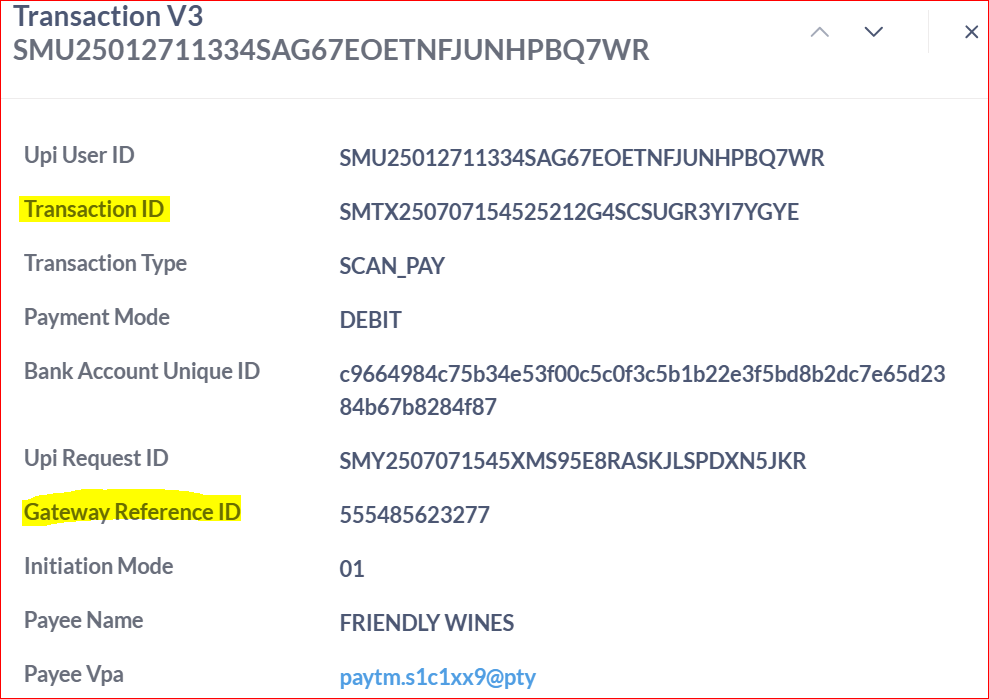
Step 1 : Open this Link provided and filter the data using the Transaction ID or Gateway Reference ID.
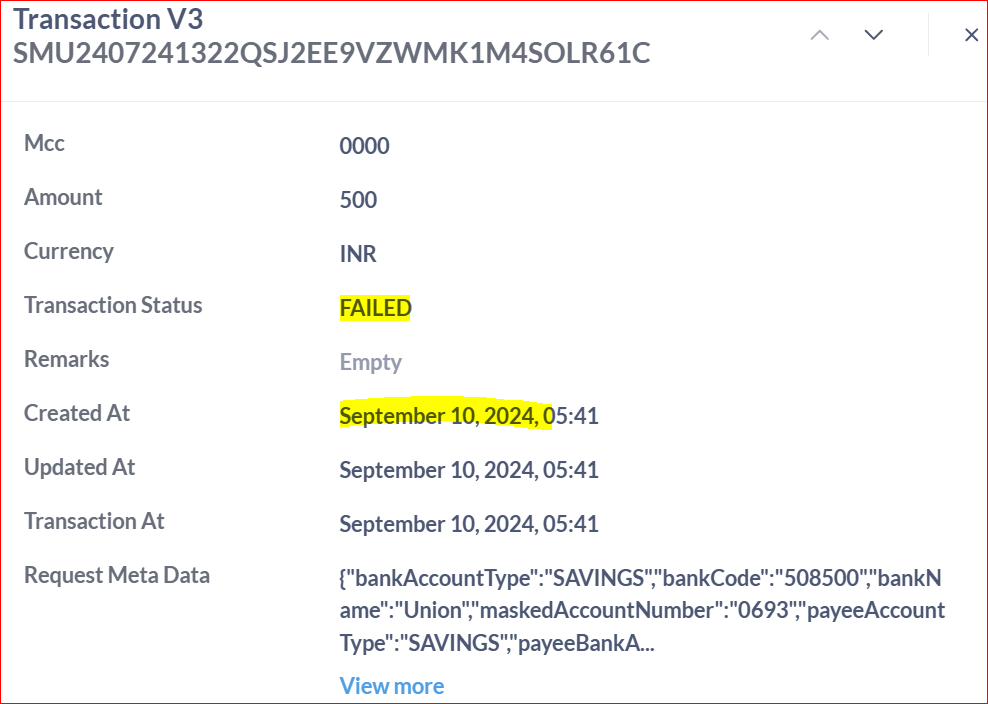
Step 2 : Click on view details of the transaction and check the Transaction status, created At timestamp to validate if the customer has raised the issue < 2 days or > 2 days
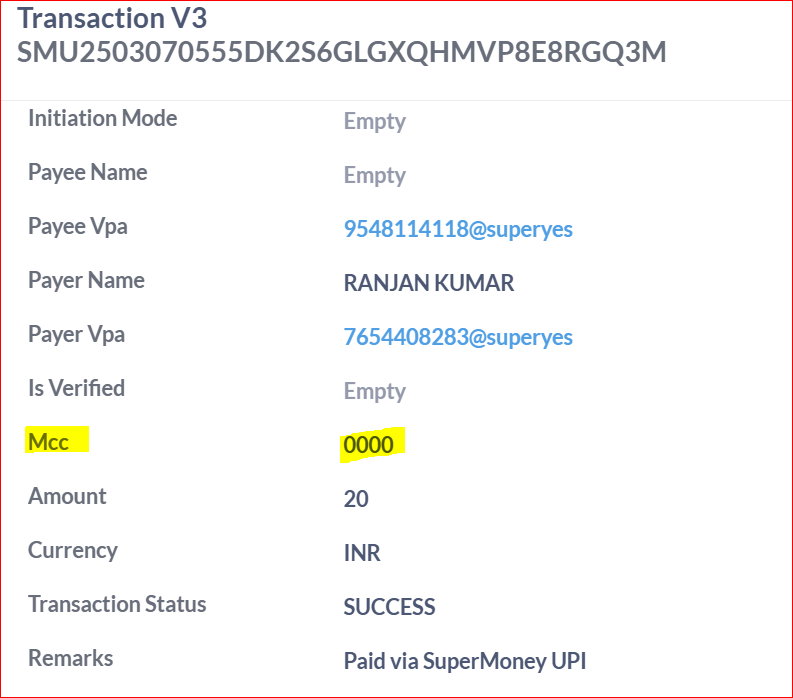
Step 3 : If the MCC field is ‘0000’, then it’s a p2p transaction. If the MCC field is other than ‘0000’ then its a p2m transaction
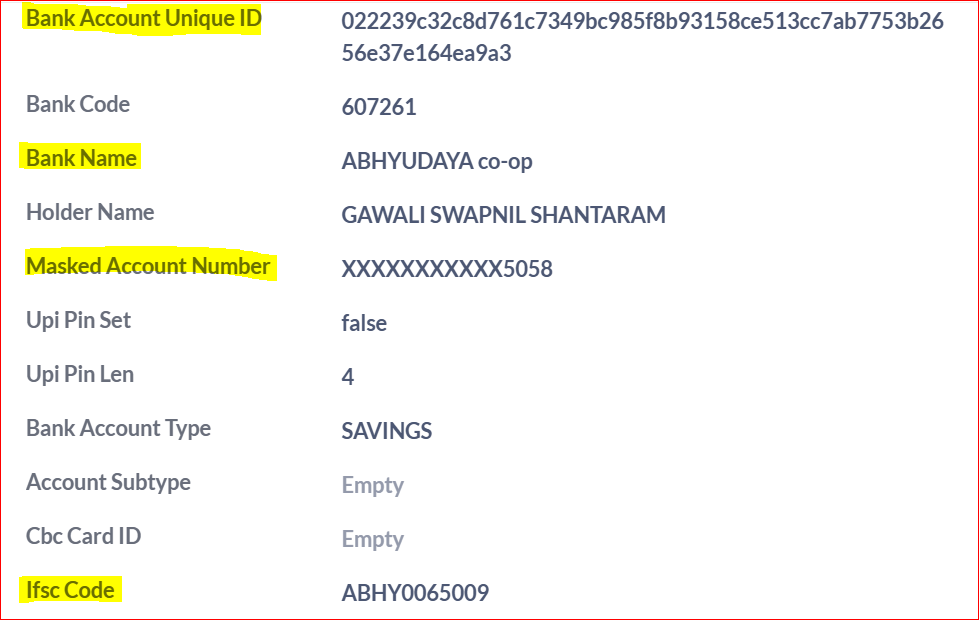
Check the below screenshots for the reference
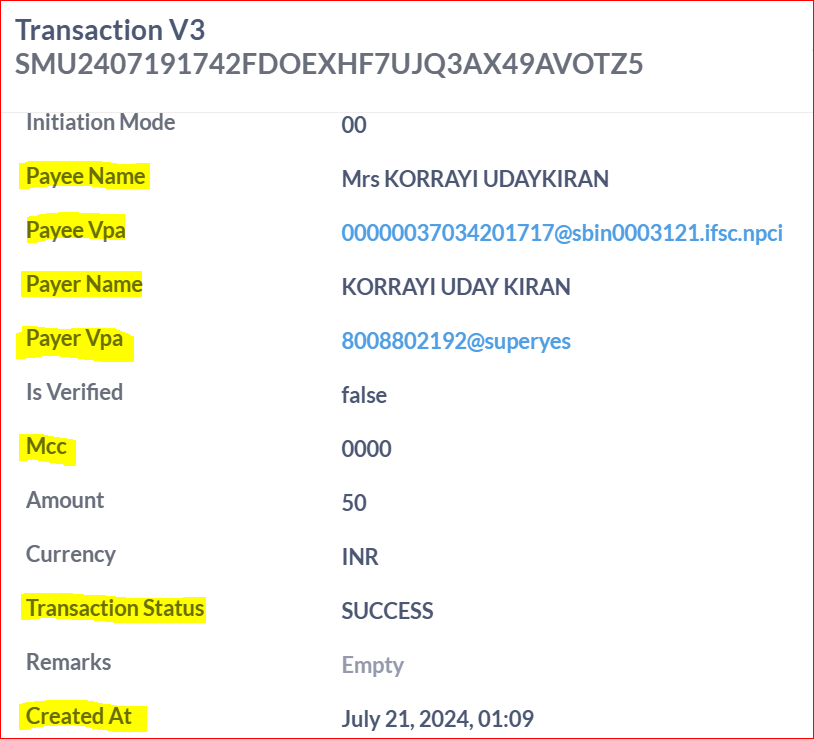
For P2P transactions:
If the payee's VPA ends with @superyes, the receiver is a super.money user, and the amount will be credited to their primary bank account as updated in the app.
If the payee's VPA does not end with @superyes, the receiver is not a super.money user, and the amount will be credited to the bank account linked to the VPA mentioned in the payee VPA in the transaction table
To check these details, Open this Link provided and filter the data using the Transaction ID or Gateway Reference ID. You will be able to view the Payee VPA, Payer Name, and other transaction details.
If the issues is less than 2 days then communicate the following to the customer:
Dear User,
Thank you for staying connected with us.
This is to inform you that the transaction has been updated as successful, which means the amount has been processed from our end. If the receiver has not yet received the funds, please don’t worry, your money is completely safe.
In rare cases, there may be a delay in the final credit due to technical reasons at the receiver's bank. This usually resolves within 24 to 48 hours.
We kindly request you to check with the receiver again after this period.
We appreciate your patience and understanding in this regard
Warm regards, Team Super.money
Tagging:
L1: UPI - Successful Transaction L2: P2P Issue L3: Receiver Claims Money Not Credited Status: Resolved
Follow up Response :
Dear User,
Thank you for staying connected with us!
We can understand your concern regarding the transaction. We kindly request you to ask the receiver to check their latest [Update the bank name using payee IFSC Code in the transaction details] for the credit entry.
Kindly inform the receiver to reach out to their bank with the Unique Transaction Reference (UTR) [GATEWAY REFERENCE ID] number for further assistance.
We appreciate your patience and understanding in this regard
Regards, super.money Support Team
|
2 | Transaction successful but money not credited to the receiver (> 2 days) |
|
Agent Checks:
To check the status of the transaction follow the below steps:
Step 1 : Open this Link and filter the column by transaction id/ gateway reference id.
Step 2 : Click on view details of the transaction and check the Transaction status, created At details timestamp to validate if the customer has raised the issue < 2 days or > 2 days
Step 3 : If the MCC field is ‘000’, then it’s a p2p transaction.
For P2P transactions:
If the payee's VPA ends with @superyes, the receiver is a super.money user, and the amount will be credited to their primary bank account as updated in the app.
If the payee's VPA does not end with @superyes, the receiver is not a super.money user, and the amount will be credited to the bank account linked to the VPA mentioned in the payee VPA in the transaction table
To check these details, Open this Link provided and filter the data using the Transaction ID or Gateway Reference ID. You will be able to view the Payee VPA, Payer Name, and other transaction details.
If the issues is more than 2 days then communicate the following to the customer: Dear User,
Thank you for staying connected with us.
The transaction has been updated as successful, which means the amount has been processed from our end. As it's been over 48 hours and the receiver has still not received the funds, we request you to reach out to your bank for further assistance.
Please share the (Gateway Reference ID) of the transaction with your bank to help them trace the credit.
Here are the details for your bank’s customer support:
Bank Name: [Insert Bank Name] Support Contact Number: [Insert Bank Support Number] Email Address : [Insert Bank Support Email]
We appreciate your patience and understanding in this regard
Warm regards, Team super.money
Use this link to see the All Bank customer support details
Tagging:
L1: UPI - Successful Transaction L2: P2P Issue L3: Receiver Claims Money Not Credited Status: Resolved |
3. | Transaction successful but money credited to wrong account (Wrong p2p) |
| Agent Checks:
To check the status of the transaction follow the below steps:
Step 1 : Open this Link and filter the column by transaction id/ gateway reference id.
Step 2 : Click on view details of the transaction and check the Transaction status, created At details.
Step 3 : If the MCC field is ‘000’, then it’s a p2p transaction.
Agent communication:
Dear User,
Thank you for reaching out to us!
We see that the transaction is successful and if a transaction is successful that means that we have received confirmation from the receiver's bank that the amount is received. In such cases, we do not have the authority to reverse the transaction.
If you have sent the money to the wrong UPI ID, we request you to reach out to the same person to get your money back.
Additionally, you can reach out to your bank and inform them about the wrong transaction. Please keep all the details and documentation ready to share with them.
Your bank may assist you in initiating the chargeback process to recover the transferred funds.
We appreciate your patience and understanding in this regard.
Regards, super.money support Team
Tagging: L1: UPI - Successful Transaction L2: P2P Issue L3: Sent to Wrong Beneficiary Status: Resolved |
4 | Transaction successful but receiver denying payment (Receiver is a super.money user) |
| Agent Checks:
To check the status of the transaction follow the below steps:
Step 1 : Open this Link and filter the column by gateway reference id.
Step 2 : Click on view details of the transaction and check the Transaction status, created At details.
Step 3 : If the MCC field is ‘000’, then it’s a p2p transaction.
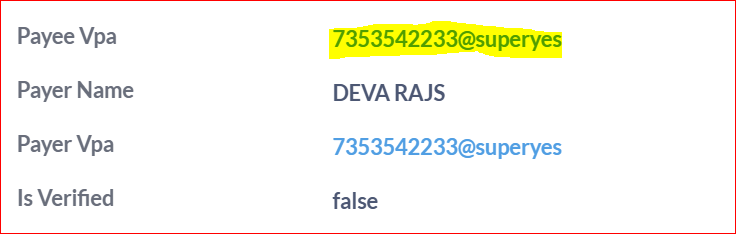
Step 4 : Check the payee VPA should end with @superyes
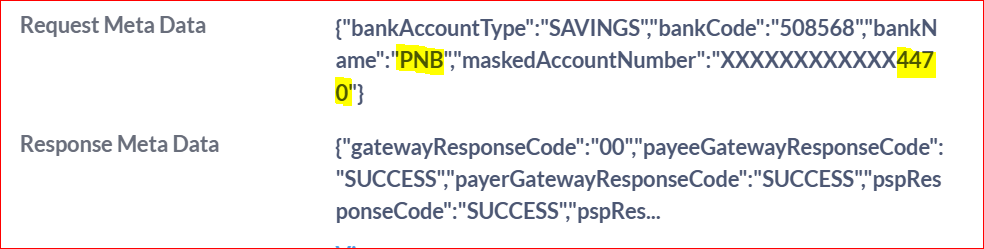
Step 5 : Click on transaction type “Credit”, click on it you can see the receiver bank name and account details in the Request meta data
Check the below screenshots for the reference
Agent communication:
Dear User,
Thank you for reaching out to us!
The account details we have shared (Account No: [Insert Account Number], IFSC Code: [Insert IFSC]) belong to the recipient linked to the transaction. If you believe this is incorrect, we recommend you contact your bank directly for further investigation.
We appreciate your patience and understanding in this regard.
Regards, super.money Support Team
Tagging:
L1: UPI - Successful Transaction L2: P2P Issue L3: Receiver Claims Money Not Credited Status: Resolved |
5 | (P2M) Transaction successful but money not credited to the receiver (< 48 hrs) |
| Agent Checks:
To check the status of the transaction follow the below steps:
Step 1 : Open this Link and filter the column by transaction id/ gateway reference id.
Step 2 : Click on view details of the transaction and check the Transaction status, created At details.
Step 3 : If the MCC field is other than ‘000’, then it’s a p2m transaction.
Agent communication:
Dear Customer, Thank you for reaching out to us. We have reviewed your transaction and can confirm that it was successful on the super.money app. This status indicates that the funds have been successfully transferred from your account and the receiver's bank has acknowledged the receipt of funds. Transaction Details: UTR (Unique Transaction Reference): [Insert UTR Number] Date & Time: [Insert Date/Time] Merchant Name: [Insert Merchant Name]
Next Steps: Since the transaction is successful, we recommend the following actions: Share UTR with Merchant: Please share the UTR number mentioned above with the merchant. They can use this reference to track the payment within their bank settlement reports. Verify with the Bank: You may also share this UTR with your bank or the receiver's bank to confirm the final credit status. Raise an issue with NPCI: If the merchant still claims non-receipt, you can raise a formal dispute with NPCI directly. Go to the Payment Details page in the super.money app, click on View Details, select Raise an issue to NPCI, and choose the relevant reason.
NPCI will investigate the status between the two banks and ensure the transaction is reconciled correctly. We appreciate your patience and understanding. Regards, super.money Support Team
Tagging:
L1: UPI - Successful Transaction L2: P2M Issue - Online L3: Pre-NPCI Complaint Status: Resolved |
5 | (P2M) Transaction successful but money not credited to the receiver (>48 hrs) |
| Agent Checks:
To check the status of the transaction follow the below steps:
Step 1 : Open this Link and filter the column by transaction id/ gateway reference id.
Step 2 : Click on view details of the transaction and check the Transaction status, created At details.
Step 3 : If the MCC field is other than ‘000’, then it’s a p2m transaction.
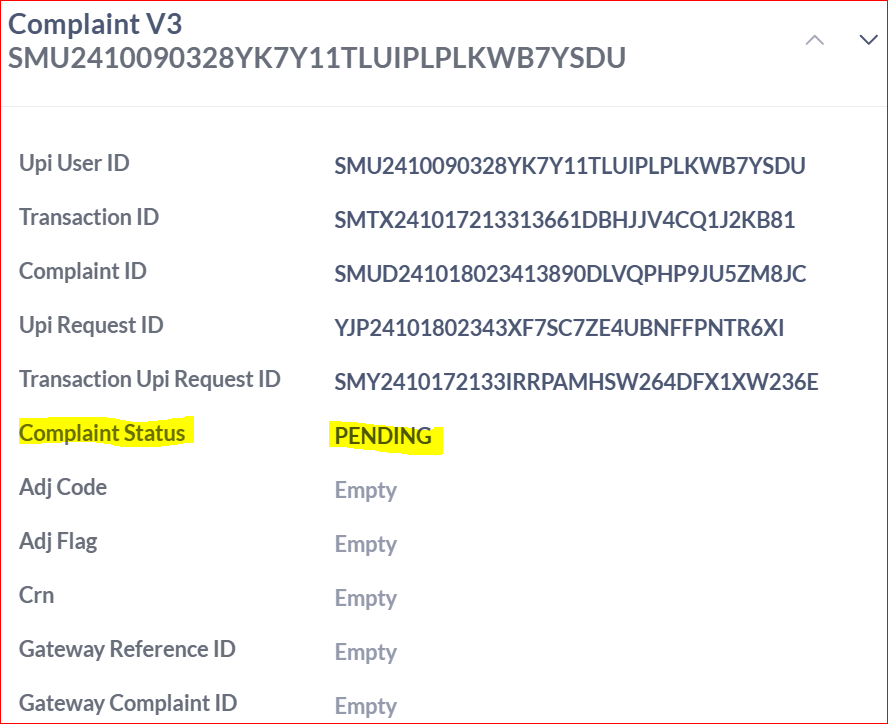
Using this Link check the complaint status of the transaction in the metabase.
Sample screenshot of the UDIR raised tickets :
Scenario A: User has already raised an NPCI disputeSubject: Update on your NPCI dispute for [Merchant Name] Dear User, Thank you for the update. Since you have already raised the issue with NPCI, we request you to kindly wait for their final resolution. Once a complaint is submitted, NPCI coordinates a technical investigation between your bank and the merchant’s bank using the UTR: [Insert UTR Number]. What you need to know: Investigation Timeline: This process typically takes up to 7 working days. Merchant Verification: In the meantime, we recommend sharing the UTR with the merchant so they can verify the credit in their settlement reports.
NPCI will update the status of your dispute directly once the banks confirm the fund movement. If you need any further assistance, feel free to reach out to us. Regards, super.money Support Team Taggings: L1: UPI - Successful Transaction L2: P2M Issue - Online L3: Post-NPCI Complaint Status: Resolved
Scenario B: User has NOT yet raised an NPCI disputeDear User, Thank you for reaching out to us. Since your transaction is marked Successful on super.money, it indicates that we have received a positive confirmation from the receiver’s bank. Transaction Reference: Next Steps: If the merchant claims the funds have not been credited, please follow these steps: Share UTR Details: Provide the UTR mentioned above to the merchant and the bank. This is the unique reference they require to track the funds. Raise an Issue with NPCI: Since this is a merchant payment and the transaction is successful at our end, you must raise a formal dispute with NPCI for an inter-bank investigation: Open the super.money app. Go to the Payment Details page of this transaction. Tap on ‘View Details’. Select ‘Raise issue to NPCI’ and choose the appropriate reason.
NPCI will verify the status between the banks and initiate a refund if the credit was not successfully completed. We appreciate your patience and understanding. Regards, super.money Support Team Tagging:
L1: UPI - Successful Transaction L2: P2M Issue - Online L3: Pre-NPCI Complaint Status: Resolved |
6 | (P2M) The transaction is successful but the merchant denies the transaction / update as failed in the third party app. |
| Agent Checks:
To check the status of the transaction follow the below steps:
Step 1 : Open this Link and filter the column by transaction id/ gateway reference id.
Step 2 : Click on view details of the transaction and check the Transaction status, created At details.
Step 3 : If the MCC field is other than ‘000’, then it’s a p2m transaction.
Using this Link check the complaint status of the transaction in the metabase
Agent communication:
Dear User,
Thank you for reaching out to us
We see that the transaction is successful on Super.money, which means the amount has been confirmed as it has failed on their platform, so we recommend raising an issue with NPCI.
To do this:
Open the super.money app
Go to the payment details page
Tap on ‘View Details’
Select ‘Raise issue to NPCI’ and choose the relevant reason
NPCI will review the transaction and assist with the resolution.
If you need any help with this process, feel free to reach out to us
Regards, super.money Support Team
Tagging:
L1: UPI - Successful Transaction L2: P2M Issue - Online L3: Order Failed - Refund Awaited Status: Resolved |
7 | (P2M) User had already raised an UDIR, but no update till now (< 7 days) |
| Tagging: Agent Checks:
To check the status of the transaction follow the below steps:
Step 1 : Open this Link and filter the column by transaction id/ gateway reference id.
Step 2 : Click on view details of the transaction and check the Transaction status, created At details.
Step 3 : If the MCC field is other than ‘000’, then it’s a p2m transaction. Using this Link check the complaint status of the transaction in the metabase
Agent communication:
Dear User, Apologies for the inconvenience caused. Since you’ve already raised the issue with NPCI, we request you to kindly wait for their response. Once the complaint is submitted, NPCI initiates an investigation with both your bank and the merchant’s bank. This process may take up to 7 working days. Alternatively, you can also raise a complaint directly with your bank using the UTR number associated with your transaction. This may help expedite the resolution. Bank Support Details: Bank Name: [Customer’s Bank Name] UTR Number: [UTR Number] Customer Care Number: [Bank Support Contact] Email/Portal: [Bank Support Email/Portal Link]
If you need any further assistance, feel free to reach out to us. Regards, super.money Support Team L1: UPI - Successful Transaction L2: P2M Issue - Online L3: Post-NPCI Complaint Status: Resolved |
8 | (P2M) user had already raised an UDIR but no update till now (> 7 days) |
| Agent Checks:
To check the status of the transaction follow the below steps:
Step 1 : Open this Link and filter the column by transaction id/ gateway reference id.
Step 2 : Click on view details of the transaction and check the Transaction status, created At details.
Step 3 : If the MCC field is other than ‘000’, then it’s a p2m transaction.
Using this Link check the complaint status of the transaction in the metabase
Agent communication: Dear User, Thank you for contacting super.money. We sincerely apologize for the delay. It has now been more than 7 days since the request was initiated without a final resolution from NPCI. To expedite this, we kindly advise you to contact your bank directly. As your bank has the necessary tools to trace the funds using the Unique Transaction Reference (UTR) provided below. Transaction Details: Bank Contact Information: Next Steps: When contacting your bank, please quote the UTR Number mentioned above. This will allow their support team to locate the specific transaction and provide you with a definitive status. If you require any further documentation from our end or have additional questions, please feel free to reach out. We are happy to assist you. Thank you for your patience and understanding. Regards, super.money Support Team Use this link to see the All Bank customer support details
Tagging:
L1: UPI - Successful Transaction L2: P2M Issue - Online L3: Post-NPCI Complaint Status: Resolved |
Payment Pending |
| Transaction is in pending state/ Deemed Transaction(< 48 hrs) | Note: Please do not resolve the ticket if the transaction is in pending. Follow up on the tickets and once the status is updated inform the customer and resolve the ticket. | Agent Checks:
To check the status of the transaction follow the below steps:
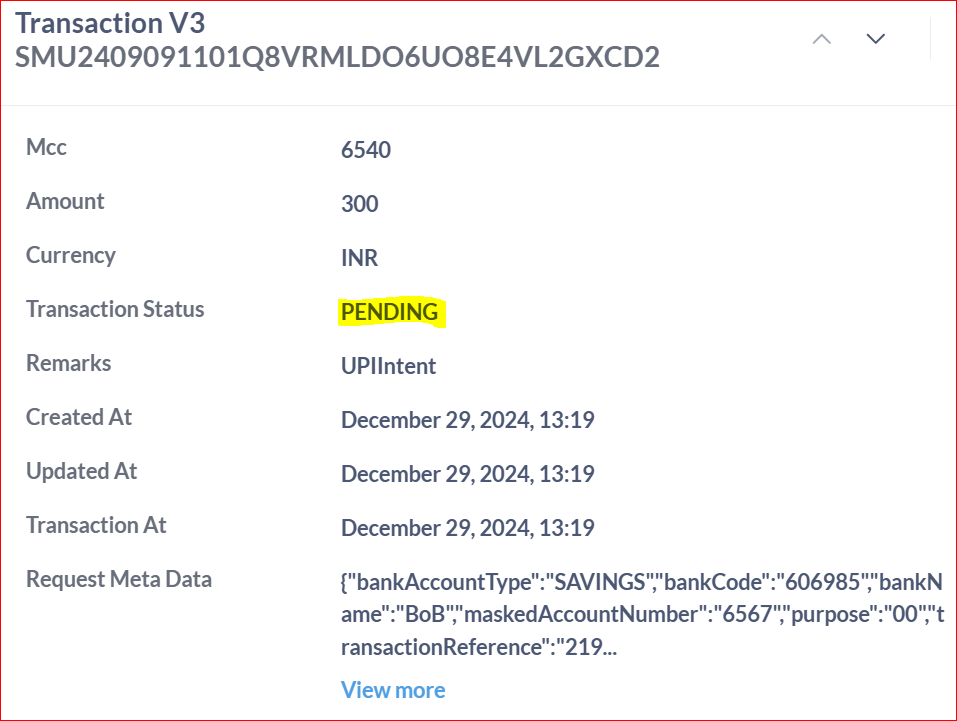
Step 1 : Open this Link and filter the column by transaction id/ gateway reference id.
Step 2 : Click on view details of the transaction and check the Transaction status, created At details
Agent communication:
Dear User,
Apologies for the inconvenience caused to you!
Banks usually complete UPI transactions instantly. In rare cases, banks may take additional time to complete the transaction due to technical issues.
Please wait for up to 48 hours for the transaction status to be updated. You can check the status on the history tab of your super.money app.
If your transaction's final status is marked as successful, the amount will be credited to the receiver's bank account.
If your transaction's final status is marked as failed, any amount deducted will be refunded to your bank account within 3 to 5 days.
We appreciate your patience and understanding in this regard.
Regards, super.money Support Team
Tagging:
L1: UPI - Pending Transaction L2: Pre-NPCI Complaint Raised L3: Customer reached in less than 48 hours Status: Waiting on Internal |
| Transaction is in pending state/ Deemed Transaction (> 48 hrs) | Note: Please do not resolve the ticket if the transaction is in pending. Follow up on the tickets and once the status is updated inform the customer and resolve the ticket. | Agent Checks:
To check the status of the transaction follow the below steps:
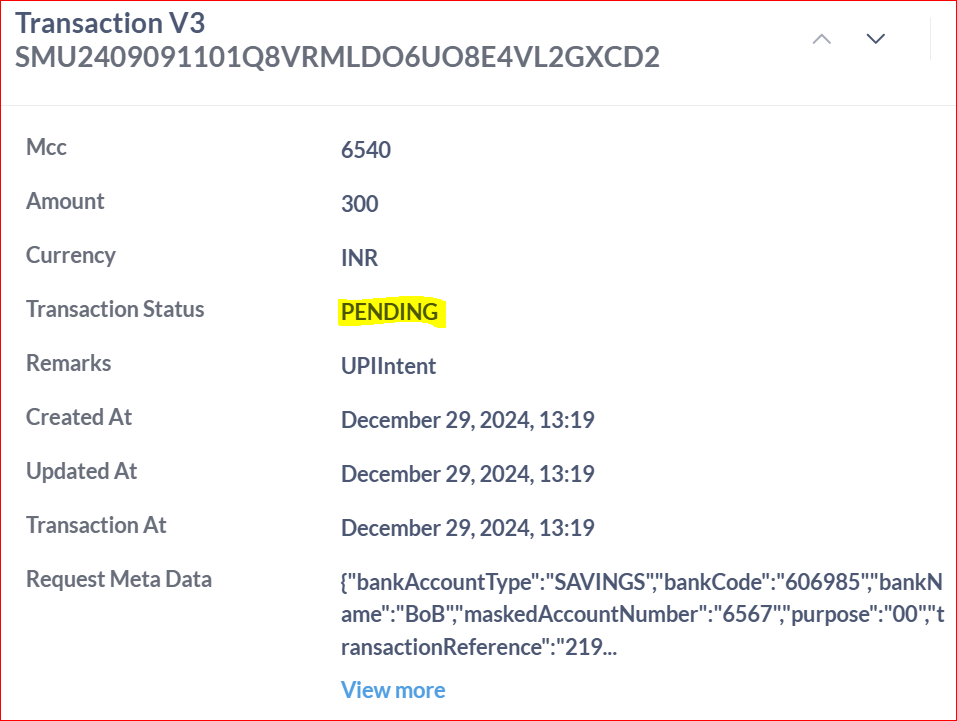
Step 1 : Open this Link and filter the column by transaction id/ gateway reference id.
Step 2 : Click on view details of the transaction and check the Transaction status, created At details
Agent communication:
Dear User,
Thank you for reaching out to us.
We apologize for the inconvenience you have experienced.
Typically, any UPI transaction that remains pending is automatically resolved within 48 hours. Unfortunately, this has not occurred in your case. To address this issue, please follow these steps to raise a ticket with NPCI:
1. Open our app and navigate to the Help and Feedback section. 2. Tap on Transactions and locate the pending transaction. 3. Select the transaction and choose the option to Raise a Ticket to NPCI.
Once you have submitted the ticket, NPCI will initiate an investigation involving both your bank and the merchant's bank. Please allow up to 7 days for them to resolve your query.
If you need further assistance, feel free to reach out to our support team.
Regards, super.money Support Team
If User had already raised an issue with NPCI
Agent communication:
Dear User,
Apologies for the inconvenience caused.
Since you’ve already raised the issue with NPCI, we request you to kindly wait for their response. Once the complaint is submitted, NPCI initiates an investigation with both your bank and the merchant’s bank.
This process may take up to 7 days.
If you need any further assistance, feel free to reach out to us.
Regards, super.money Support Team
If user still didn't raise any NPCI request
Agent communication
Dear User,
Thank you for reaching out to us!
Since your transaction is marked successful on super.money, it means we’ve received confirmation from the receiver’s bank that the amount was credited.
If the receiver hasn't received the funds, please don’t worry — your money is completely safe.
As this is a merchant payment and the transaction is successful, we recommend raising a complaint with NPCI. To do so:
Open the super.money app
Go to the payment details page
Tap on ‘View Details’
Select ‘Raise issue to NPCI’ and choose the appropriate reason
NPCI will then verify the status and initiate the refund if required.
We appreciate your patience and understanding.
Regards, super.money Support Team
Tagging:
L1: UPI - Pending Transaction L2: Pre-NPCI Complaint Raised L3: Customer reached after 48 hours Status: Waiting on Internal
|
| Disputed Successful Credit | Verification: Confirm the transaction status is "SUCCESS" and obtain the 12-digit UTR number from the METABASE. Check the Tags and entry_type: CREDIT in Metabase. If it is CREDIT, please follow the below steps. Statement Validation: Ask the user to pull an updated bank statement (not just check SMS notifications) and look specifically for the UTR or the sender's name. Bank-to-Bank Trace: If the user insists the funds are missing, advise them that since the transaction is successful at the network level, only the Beneficiary Bank can trace the internal movement of those funds. Dispute Window: Remit the user to their bank to raise a "Credit Not Received" dispute.
| Dear User, Thank you for reaching out to us. We have thoroughly investigated your transaction of ₹{Amount} done on {Date}. According to our records and the banking network, this amount has been successfully credited to your bank account ending with {Last 4 Digits} under UTR: {UTR}. Next Steps to Locate Your Funds: Check Bank Statement: Sometimes SMS alerts are delayed. Please check your official bank statement or passbook for an entry matching the UTR: {UTR}. Internal Bank Delay: Occasionally, a bank may mark a transaction as successful but take a few hours to reflect the balance in your "Available Balance." Contact Your Bank: If the funds are still not visible after 24 hours, please contact {Recipient_Bank_Name} directly. Since this is a successful bank-to-bank transfer, they can use the UTR number provided above to trace the funds within their system.
Support Details for {Recipient_Bank_Name}: Note: As a UPI app, super.money facilitates the transfer but does not hold your funds. Once a transaction is marked successful, the responsibility for crediting the amount lies entirely with the receiving bank. Regards, super.money Support Team
Taggings: L1: UPI - Credit Transaction L2: User Disputes Successful Credit |
| Amount Sent to Dormant/Inactive Account | 1. Investigation Steps Verify Transaction Status: Confirm the transaction is "Success" in the internal dashboard. Clarification: Explain to the user that a "Success" status means the recipient's bank has accepted the funds. super.money facilitates the transfer of funds between banks. Once a transaction is marked "Success," the funds have left the sender's bank and reached the destination bank. We cannot "reverse" a successful transaction.
2. Mandatory Action & Resolution For the Sender: Advise them to contact the receiver and ask the receiver to speak with their bank. For the Receiver: The receiver must visit their bank branch to "unfreeze" the account or complete KYC to access the funds. The money is held by the destination bank, not lost in transit.
| Dear User, We understand your concern regarding the funds sent to an inactive or dormant account. Upon checking, we see that the transaction of ₹[Amount] made on [Date] is Successful. This means the funds have been successfully accepted and credited to the recipient's bank. When an account is dormant or inactive, the bank usually "freezes" the funds rather than rejecting the credit. The money remains securely with the recipient's bank. Next Steps: Ask the Receiver to contact their bank: The person you sent the money to needs to visit their bank branch to complete their KYC or reactivate the account. Accessing Funds: Once the receiver's bank account is reactivated, the funds will be available for them to use or transfer back to you. Raise a Dispute with your Bank: If you are unable to coordinate with the receiver, you can contact your own bank (the remitter bank) to raise a formal dispute or chargeback. They can communicate with the recipient's bank to initiate a reversal request, though this is subject to the recipient's bank's approval.
As the transaction was completed successfully, super.money cannot reverse the payment. We recommend coordinating directly with the recipient to resolve this. Regards, super.money Support Team
Taggings: L1: UPI - Successful Transaction L2: P2P Issue L3: Sent to Dormant/Inaccessible Account
|